Data Providers
Following the pre-installed Data Providers as installed with inPoint. Note that those are also Plugins and can extended based on your needs.
None
This is used to exclude „special“ fields from being evaluated, for example Button/Links/CommandBar/etc...
Blob

Uses a Binary Serialization to load/save data into PAM_USERDATA (an inPoint
Table)
Advantages
- No need to configure anything on the server
- Supports any Editor type
- Easy cleanup (SQL table rows easy to identify)
Disadvantages
- The data is not accessible - no way to query the data on the SQL side, tricky to deserialize in other (external) controls
- Performance – depending on how many Attributes there are
- All resides on one big SQL table
- No FullText indexing!
ItemFields

Supports loading/saving directly from inPoint fields (Folder/Document).
Advantages
- Such inPoint fields can be marked for the Search and are thus available in the FullText index
- Easier to load existing data into an ExtraAttributes form
Disadvantages
- Each field needs to be defined twice – once in inPoint and once in the ExtraAttributes (types must match!)
- The inPoint Fields cannot be used for editing (they get overwritten by the ExtraAttributes) – so basically they must remain hidden
Repository

Uses a pre-defined Lookup Repository (a custom SQL Table) to save/load data. Basically if you have a normal (non-repeating) Form with a list of Fields.
Advantages
- Fast
- Easy to migrate existing data into ExtraAttributes forms
- One Row – One Item (Folder or Document) – makes it easy to identify (per default by ItemUri)
Disadvantages
- Lookup Repository need to be pre-created and pre-defined in inPoint.Core
- SQL Columns must be manually created in the ExtraAttributes (names must match!)
NOTE: SEQID column also needs to be defined as an Attribute
GridRepository
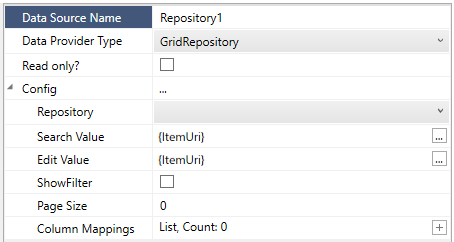
When using the Grid Editor, you could basically have multiple rows all attached to the same item (Folder/Document). As such the Repository DataProvider is not enough, and instead (just for the Grid) you need to use the GridRepository DataProvider.
Advantages
- Separate store of Grid data, which allows external access to the data (for migrations/reporting)
Disadvantages
- If you have multiple Grids, you need to start using ColumnMappings to map the different SEQIDs
Parameters
Repository
Which pre-defined Lookup Repository to use
SearchValue
When LOADING data will filter the VALUE column with this SearchValue
EditValue
When SAVING data will fill the VALUE column with this EditValue
ShowFilter
Default: no
Whether to allow to the user to filter the data using a text keyword
PageSize
Default: 0
How many rows to returns at once, using 0 will use the configured server LookupLimit Server Setting (default: 10000), or use a number to force paging
Column Mappings
This allows to define a mapping between how columns are named as coming from the DataProvider and how they are identified (by CommonName) in the ExtraAttributes.
NOTE: SEQID column also needs to be defined as an Attribute
LinkedGridRepository
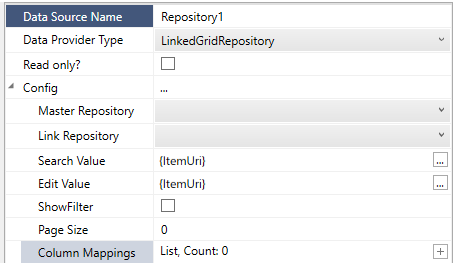
When using the Grid Editor, you could basically have a Master table (e.g. Employees) and a linked table (e.g. ProjectEmployess) where you want to select from the Master Employess table without duplicating the data, and optionally have extra fields in the Linked table that only relate to the current Item (Folder/Document).
Advantages
- Allows advanced data models joined by parent/id relationship (1 to many)
- Allows central administration of data without duplicating it all over the place
- Best used with the Master/Detail view feature and GridButtonBar
Disadvantages
- More complex to setup (2x Lookup Repository, 2x Folders, 2x Datasources, etc...)
- You cannot edit the Master data in the Linked Grid – as such you would need two separate Folders to edit the Master data (which is actually a good security feature as well)
- Can feel more complex for the users
- If you have multiple Grids, you need to start using ColumnMappings to map the different SEQIDs and PARENTSEQIDs
Parameters
Master Repository
Which pre-defined Lookup Repository to use (readonly – when joining based on the PARENTSEQID column)
Link Repository
Which pre-defined Lookup Repository to use as the “joined” writable Repository
SearchValue
When LOADING data will filter the VALUE column with this SearchValue
EditValue
When SAVING data will fill the VALUE column with this EditValue
ShowFilter
Default: no
Whether to allow to the user to filter the data using a text keyword
PageSize
Default: 0
How many rows to returns at once, using 0 will use the configured server LookupLimit Server Setting (default: 10000), or use a number to force paging
Column Mappings
This allows to define a mapping between how columns are named as coming from the DataProvider and how they are identified (by CommonName) in the ExtraAttributes.
NOTE: SEQID, PARENTSEQID columns also needs to be defined as an Attribute
ExternalSource
This DataProvider connects directly from the Client to any Server (based on the provided SQL Connection string) and queries the configured „SQL Table“. Since this must return ONE row of the data, the „SQL Search Column“ is filtered based on the „Search Value“ (which can be an Expression).
