Configurable performance tuning
General
You might encounter performance problems with the document list having lots of documents (million or more). Main goal is to improve the performance on the SQL statements, while retrieving the document list. This can be achieved by using the correct SQL hints.
There's no generic hint which will fix all performance problems. In other words a hint which improves the performance for retrieving 1 million documents might slow down the performance when retrieving 100 documents. Therefore there is a possibility to define the hints per item URI.
The tuned performance achieved by using hints is not depending only on the number of records but also on the environment.
Configuration
The custom hints are configurable in the inPoint.Client for the user who is member of the root group or the tenant admin group.
In the case of batch processing it's possible to configure the hints by the 'Configure_DBSearchHintsSettings.ps1' custom PowerShell script included in the
inPoint_Tools_\<version>_<suffix>.zip, containing several sample code snippets how to configure the hints for the given item URI.
Configurable for these site types
- Global site
- any global site in any tenant
- any GSR in any tenant
- any flat archive unit in any tenant
- My site
- any my site in any tenant
- Mail site
- any mailbox in any tenant
Scope of the customization
- Folder - the hint is configured for the given item URI
Configurable only for the following object types
- Folders
- Documents
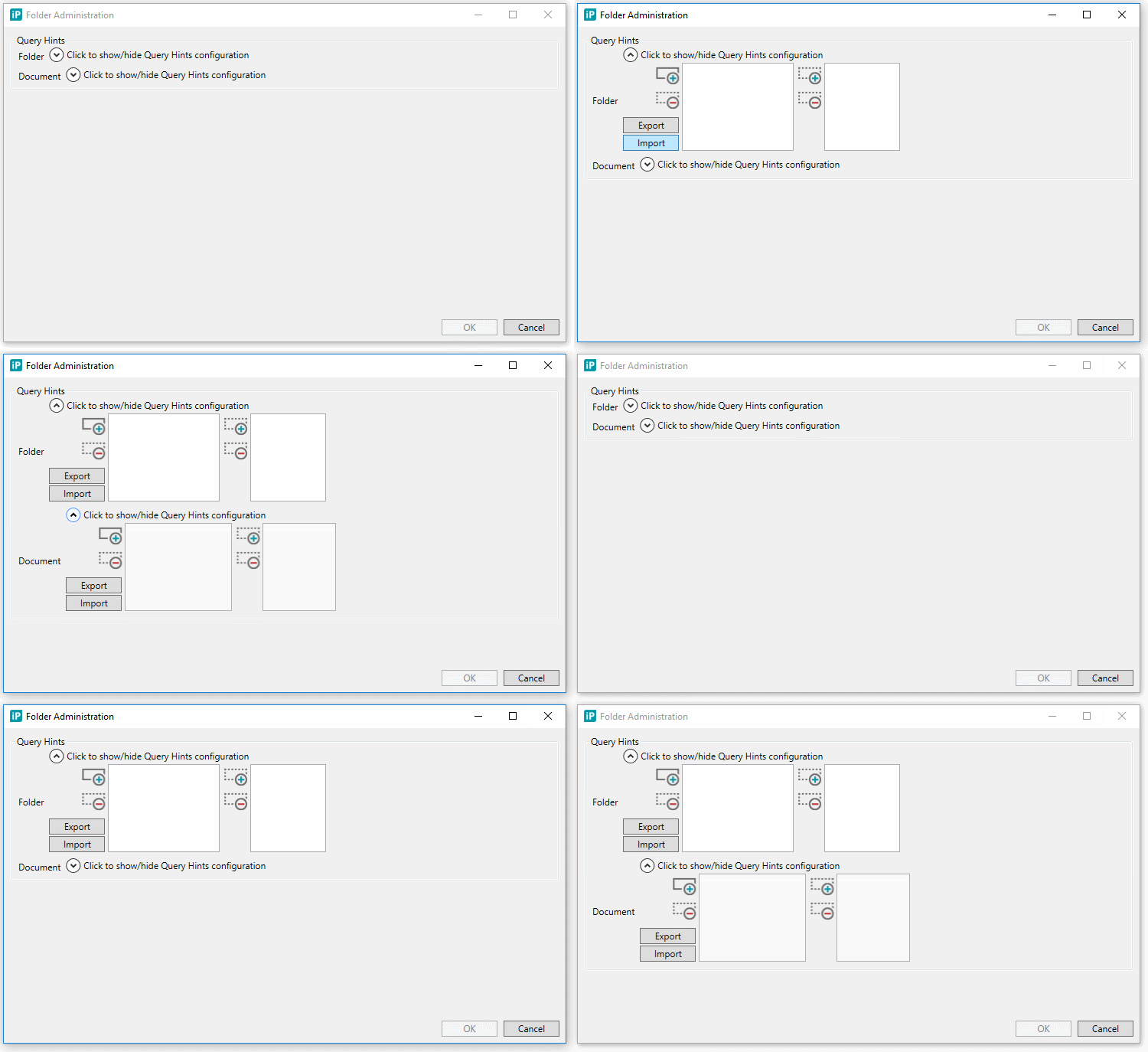
Defining DB query hints for specific query types
-
Query type which retrieves the list of documents
-
Hints for default sort (ASC)
-
Hints for default sort (DESC)
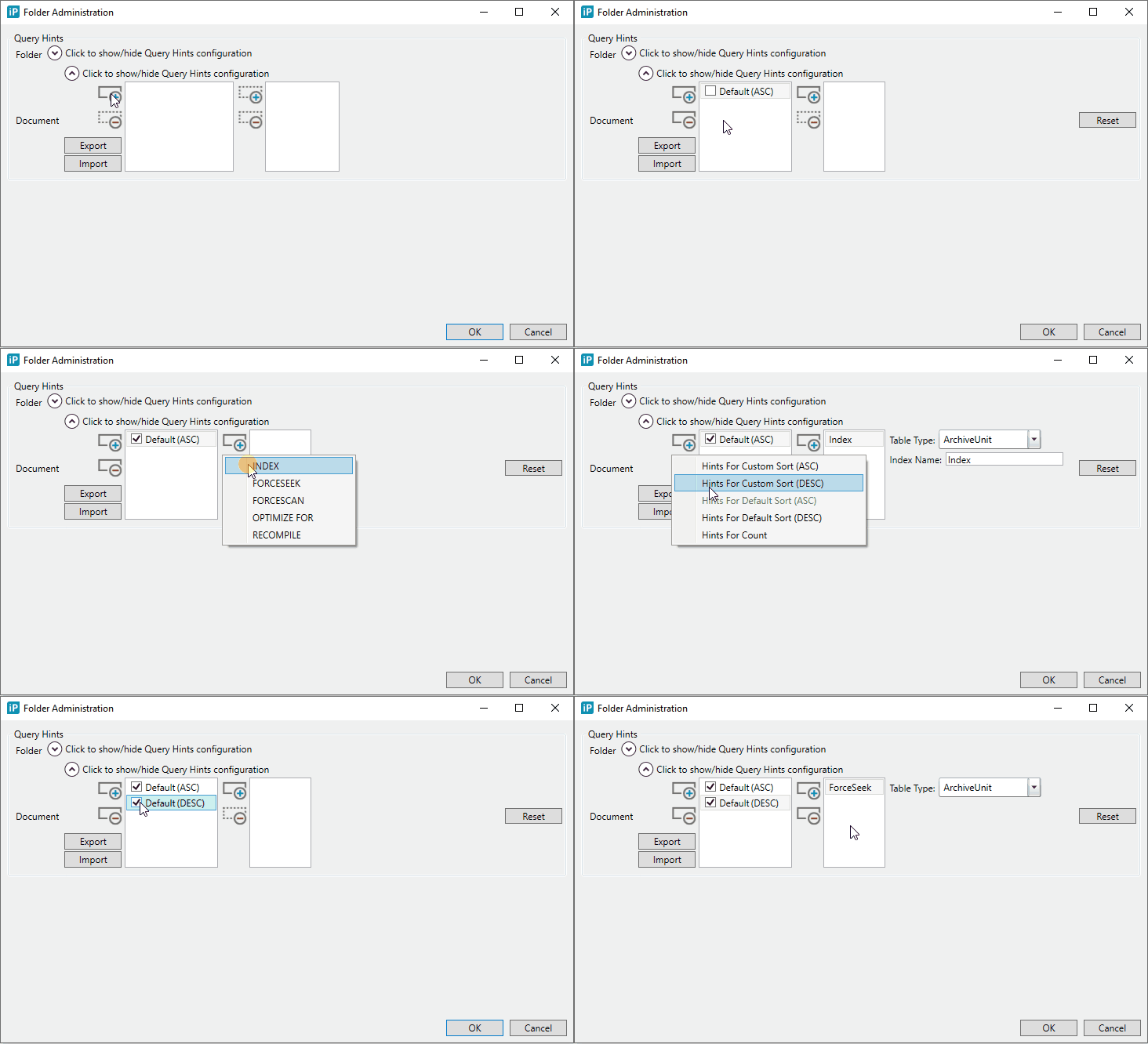
-
Hints for custom sort (ASC)
In the case when clicking on the column header in the document list. It's allowed to define hints on multiple custom sorts when the sort direction is Ascending. -
Hints for custom sort (DESC)
In the case when clicking on the column header in the document list. It's allowed to define hints on multiple custom sorts when the sort direction is Descending.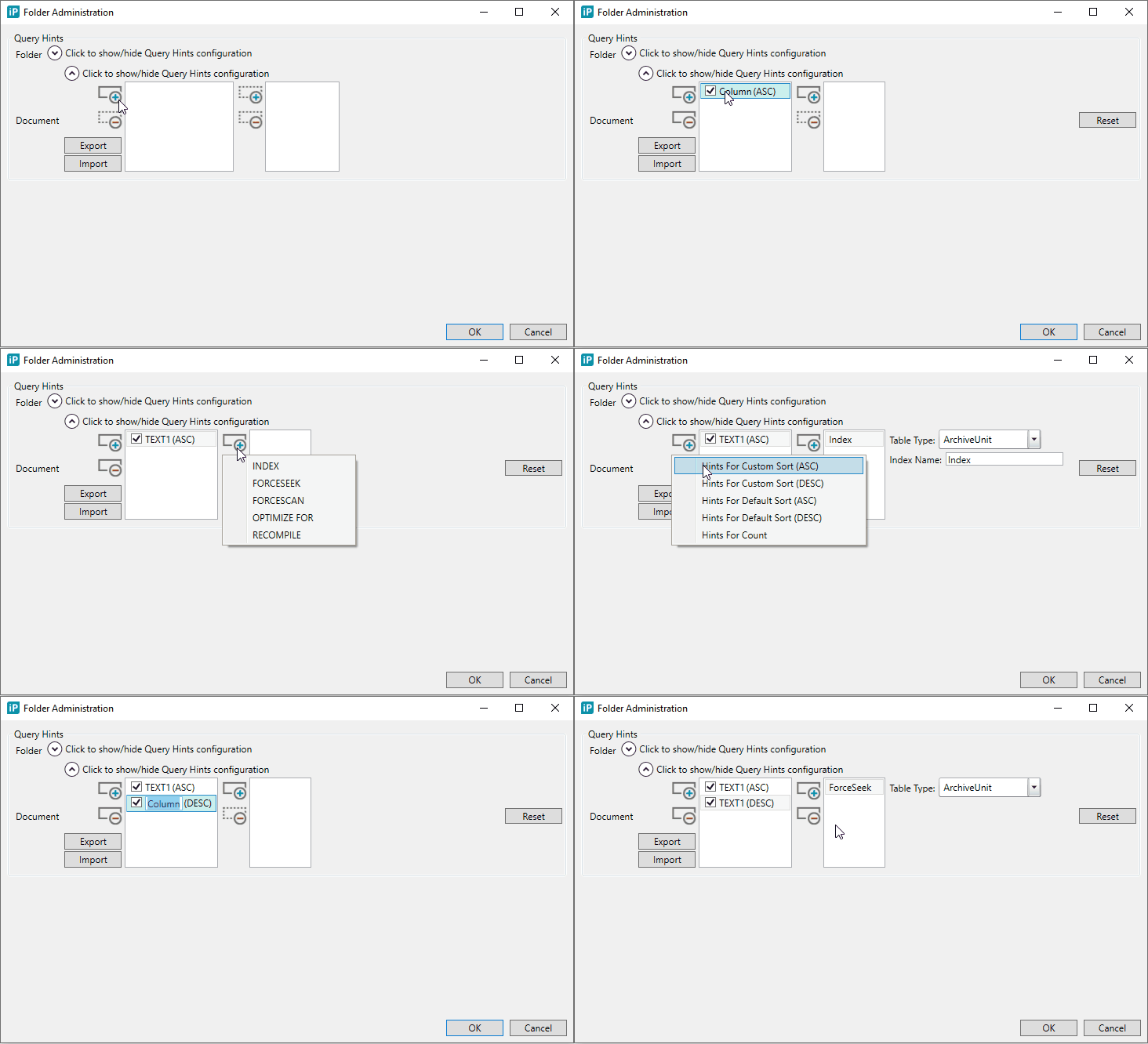
-
-
Query type which gets the document count
Executed in the case when paging is allowed.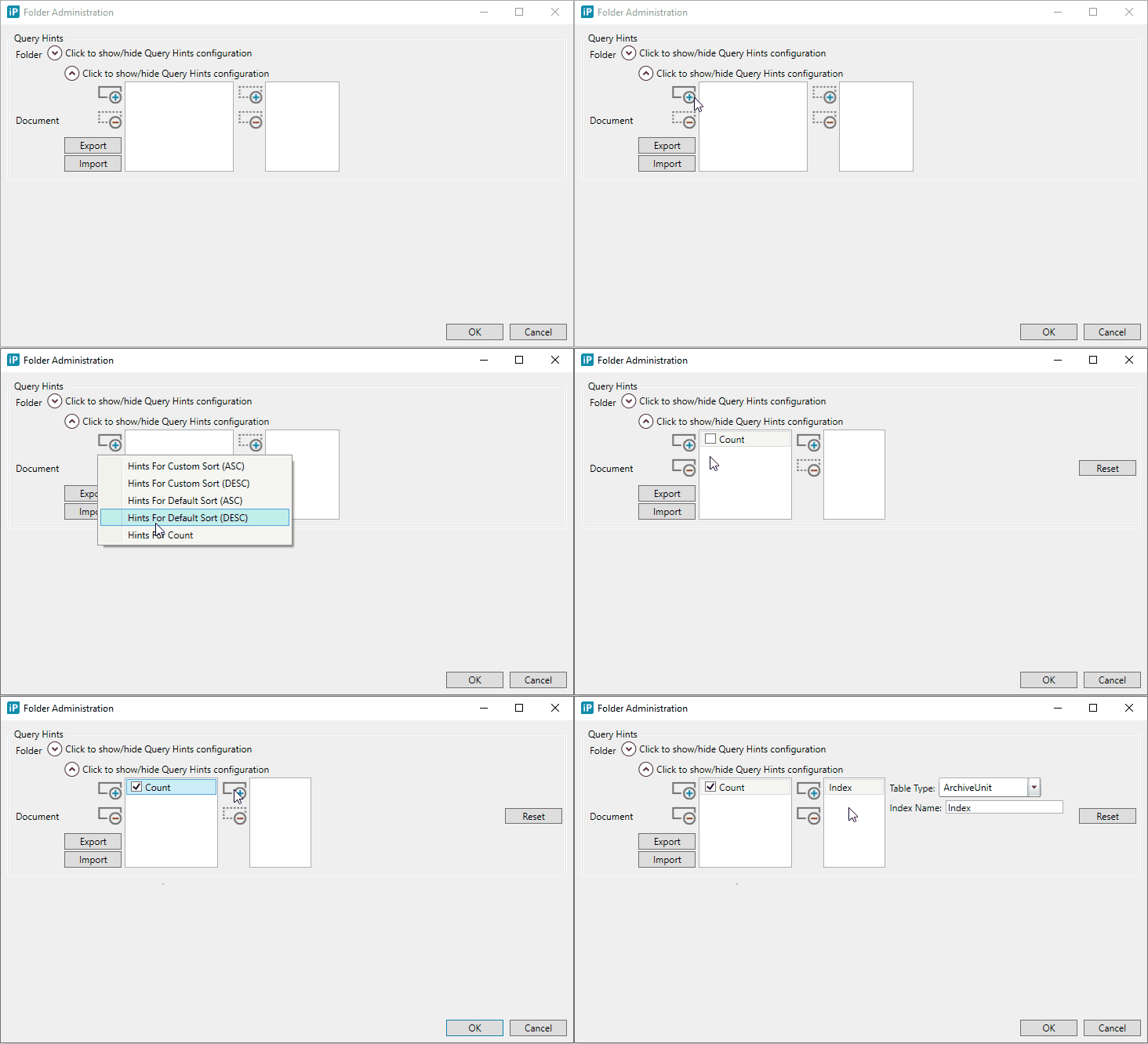
Cascading hints settings
Each hints settings can apply to a certain level. Each hints settings in every level can be Reset to the previous level setting. Each level is defined in a different Settings window, as specified below:
-
Admin level
Configurable in the Admin Settings window.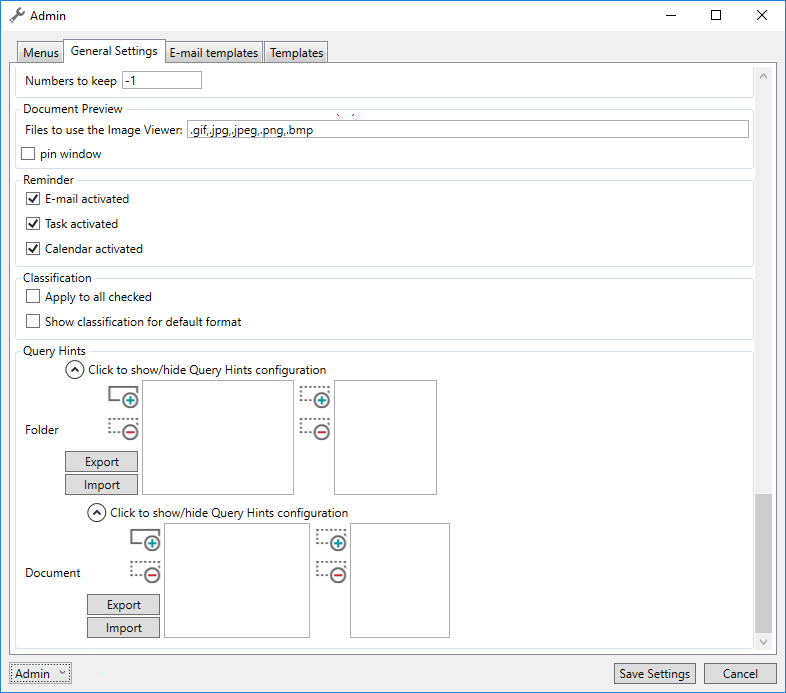
-
Tenant level
Configurable in the Admin Settings window.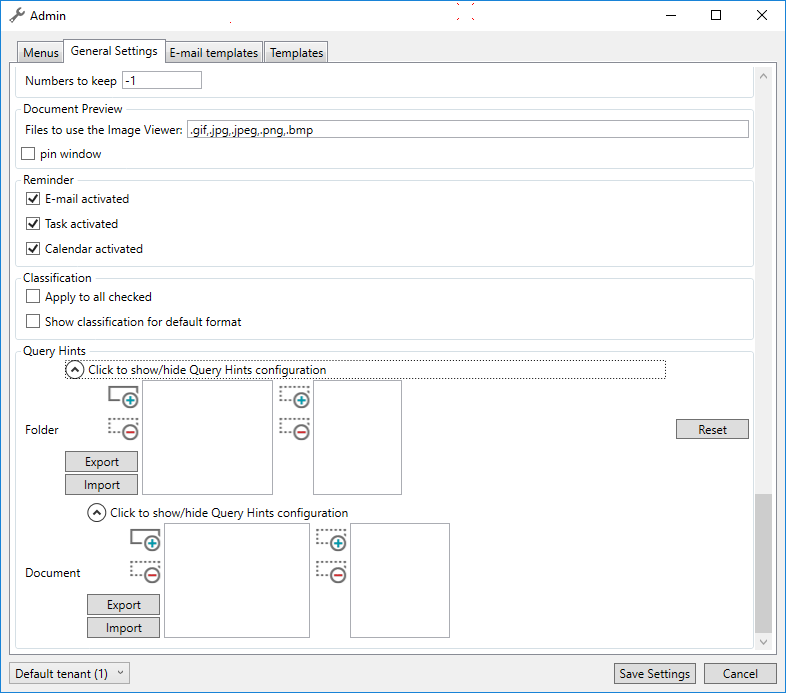
-
Site level
Configurable in the Global Site Administration.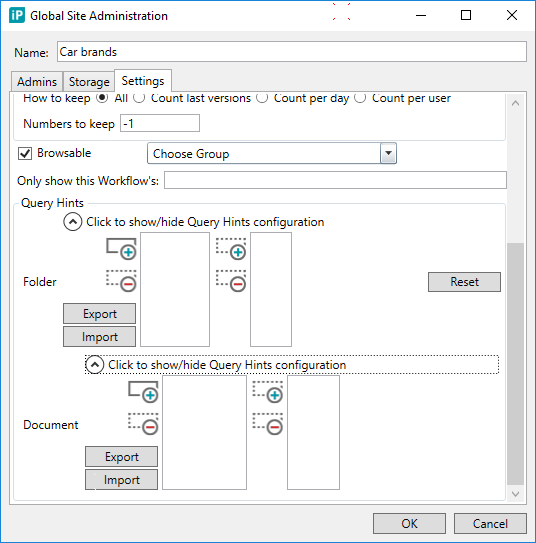
-
Format level
Configurable in the Field Selection window.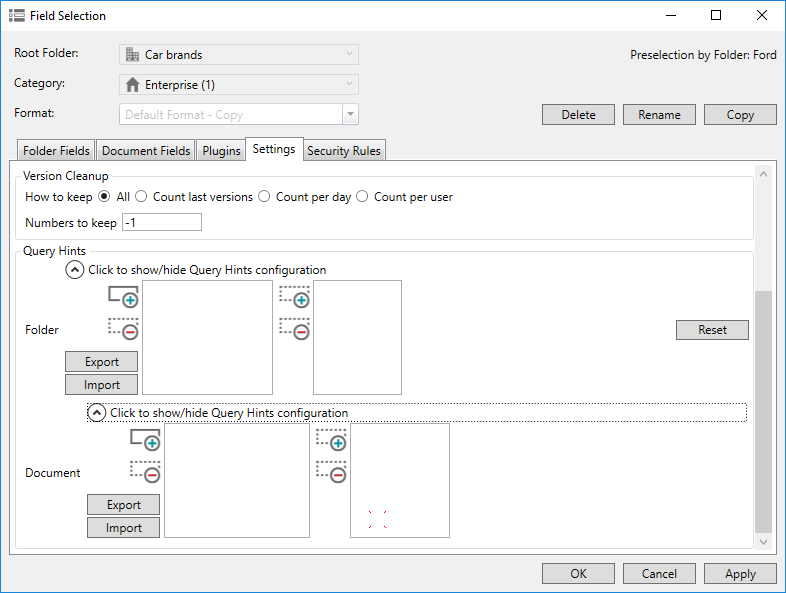
-
Folder level
Configurable in the Folder Administration action menu.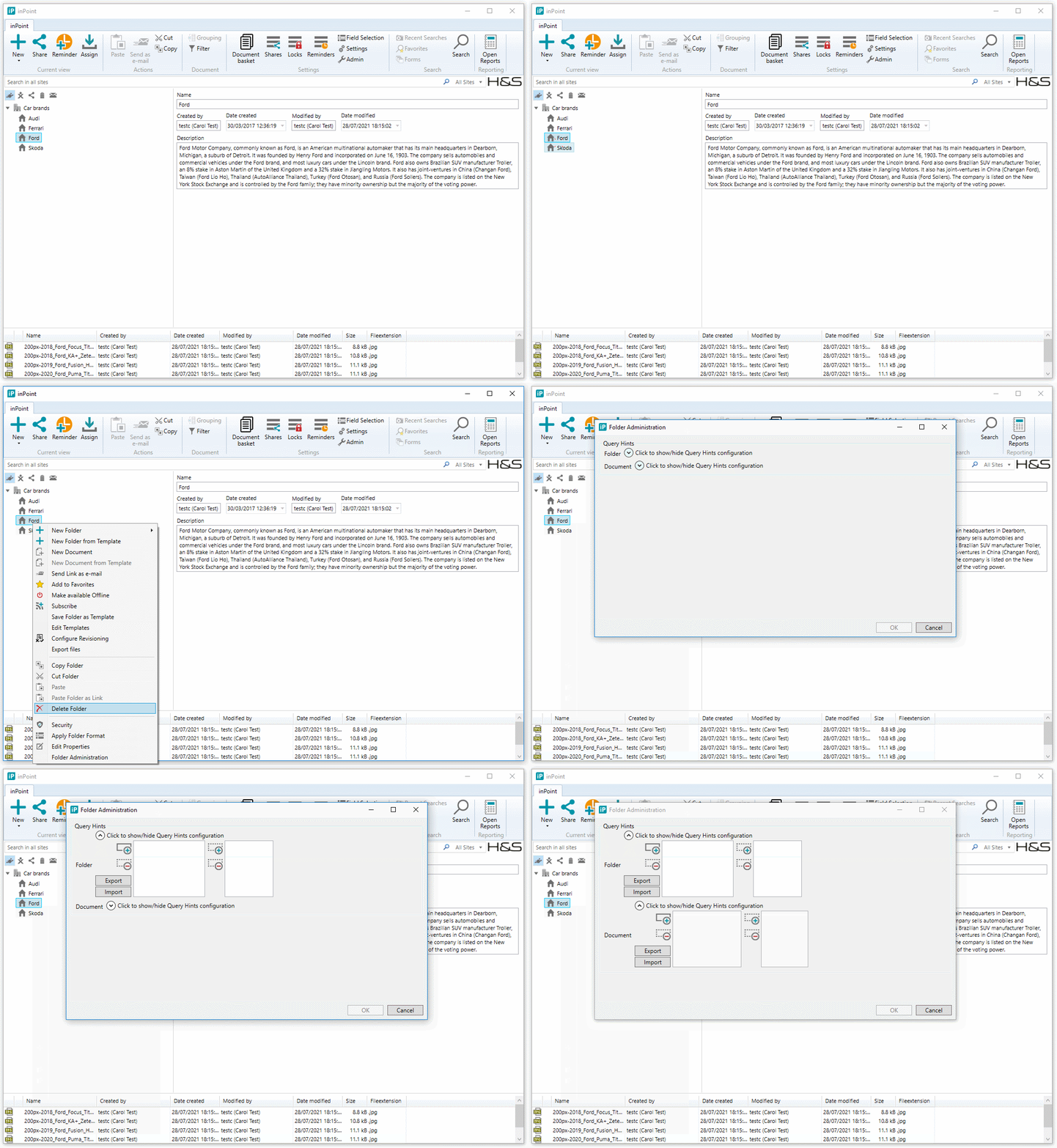
Hints
Supported databases
- MS SQL
- Oracle
Quick overview of the MS SQL hints
- Table hints
Table hints override the default behavior of the Query Optimizer by specifying a locking method, one or more indexes, a query-processing operation such as a table scan or index seek, or other options. Table hints are specified in the FROM clause of the DML statement and affect only the table or view referenced in that clause. Detailed description see: Table hints
- Query hints
Query hints specify that the indicated hints are used in the scope of a query. Query hints are specified as part of the OPTION clause. Detailed description see: Query hints
Quick overview of the Oracle hints
- Single-table hints
Single-table hints are specified on one table or view.
- Multi-table hints
Multi-table hints are like single-table hints, except that the hint can specify one or more tables or views. LEADING is an example of a multi-table hint.
- Query block hints
Query block hints operate on single query blocks.
- Statement hints
Statement hints apply to the entire SQL statement. ALL_ROWS is an example of a statement hint.
Detailed description see: Using Optimizer Hints
Supported MS SQL hints in inPoint
- Table hints:
- INDEX
- Arguments:
- TableType (Predefined enumeration)
- Folder
- Link
- ArchiveUnit
- Permission
- IndexName
- TableType (Predefined enumeration)
- Arguments:
- FORCESEEK
- Arguments:
- TableType (Predefined enumeration)
- Folder
- Link
- ArchiveUnit
- Permission
- TableType (Predefined enumeration)
- Arguments:
- FORCESCAN
- Arguments:
- TableType (Predefined enumeration)
- Folder
- Link
- ArchiveUnit
- Permission
- TableType (Predefined enumeration)
- Arguments:
- INDEX
- Query hints:
- 'OPTIMIZE FOR'
- Optional arguments:
- List of column names (can be empty)
- Optional arguments:
- RECOMPILE
- 'OPTIMIZE FOR'
Supported Oracle hints in inPoint
- Single-table hints:
- INDEX
- Arguments:
- TableType (Predefined enumeration)
- Folder
- Link
- ArchiveUnit
- Permission
- IndexName
- TableType (Predefined enumeration)
- Arguments:
- INDEX_COMBINE
- Arguments:
- TableType (Predefined enumeration)
- Folder
- Link
- ArchiveUnit
- Permission
- List of index names
- TableType (Predefined enumeration)
- Arguments:
- INDEX_FFS
- Arguments:
- TableType (Predefined enumeration)
- Folder
- Link
- ArchiveUnit
- Permission
- List of index names
- TableType (Predefined enumeration)
- Arguments:
- FULL
- Arguments:
- TableType (Predefined enumeration)
- Folder
- Link
- ArchiveUnit
- Permission
- TableType (Predefined enumeration)
- Arguments:
- INDEX
- Multi-table hints:
- LEADING
- Arguments:
- List of table types (Predefined enumeration)
- Folder
- Link
- ArchiveUnit
- Permission
- List of table types (Predefined enumeration)
- Arguments:
- USE_NL
- Arguments:
- List of table types (Predefined enumeration)
- Folder
- Link
- ArchiveUnit
- Permission
- List of table types (Predefined enumeration)
- Arguments:
- LEADING
- Statement hints:
- ALL_ROWS
- Arguments:
- QueryBlockName (Predefined enumeration)
- Main
- Paging
- Count
- Position
- Permission
- QueryBlockName (Predefined enumeration)
- Arguments:
- FIRST_ROWS
- Arguments:
- QueryBlockName (Predefined enumeration)
- Main
- Paging
- Count
- Position
- Permission
- RowsNumber
- QueryBlockName (Predefined enumeration)
- Arguments:
- ALL_ROWS
Step by step guide how to find the slow queries
Logging
-
Turn the logging level to DEBUG mode in the inPoint server log4net.config file.
Example:
<root>
    <level value="DEBUG" />
    <appender-ref ref="OutputDebugStringAppender" />
    <appender-ref ref="RollingFileAppender" />
</root>

<logger name="PSW" additivity="false">
    <!--Possible values for 'value'
        DEBUG   => display start and end of timed operation
        INFO    => display end only
        OFF     => don't log
        -->
    <level value="DEBUG" />
    <appender-ref ref="PerformanceOutput" />
    <appender-ref ref="OutputDebugStringAppender" />
</logger>
Finding the slow queries
-
Open any folder in GLOBAL/MY/MAIL site having performance problems in the document list using the
inPoint.ClientorinPoint.Web. -
Open the inPoint server performance log file (by default it's
c:\temp\inPoint.WebDav.Performance.log) and search for the following phrase:GetDocumentContent (dbSearchQueryType, guid, uri): -
You might find it serveral times. You need to focus on those which has long execution time:
Example:
2021-06-22 16:21:07.201 DEBUG w3wp [11728/94] PSW.workplace.searchenginemodule.SearchEngineModule - <start><id>00002dd0000007fe</id><info>GetDocumentContent (dbSearchQueryType, guid, uri):</info> <a>List</a> <a>c73702dc-0c83-400d-ad46-8312dce1ce97</a> <a>pam-item://hierarchy=11@path=42$8\,43$5\,44$6\,45$9</a></start>
...
2021-06-22 16:21:07.248 INFO  w3wp [11728/94] PSW.workplace.searchenginemodule.SearchEngineModule - <stop><time>    10000</time><id>00002dd0000007fe</id>	<info>GetDocumentContent (dbSearchQueryType, guid, uri):</info> <a>List</a> <a>c73702dc-0c83-400d-ad46-8312dce1ce97</a> <a>pam-item://hierarchy=11@path=42$8\,43$5\,44$6\,45$9</a></stop>
In the example above we can see that getting the document list took 10 seconds.
-
You need to find the query behind.
Each
<start>and<stop>log event is identified by the same GUID, in our example it's:c73702dc-0c83-400d-ad46-8312dce1ce97. The corresponding query with slow performance is also identified by the same GUID, in our example it's:c73702dc-0c83-400d-ad46-8312dce1ce97, but it's located in a separate log file (by default it'sc:\temp\inPoint.WebDav.log). Search for thec73702dc-0c83-400d-ad46-8312dce1ce97and you will find the related query:Example:
2021-06-22 16:21:07.235 DEBUG w3wp     [11728/94] workplace.searchenginemodule.Searcher - Search query (Level type:Document, Query type:List, Custom sort:<null>, Guid:c73702dc-0c83-400d-ad46-8312dce1ce97, Uri:pam-item://hierarchy=11@path=42$8\,43$5\,44$6\,45$9):
DECLARE @L49_DOCSYSTYPE1 int     = 0;
DECLARE @RIGHT_IDD      int     = 27;
DECLARE @USER_ID        int     = 10;
DECLARE @PAMWORLD_GROUP_ID int     = 3;
DECLARE @ID             int     = 9;
SELECT ACL_ID49, DOCID, DOCDELETED, DOCNAME, DOCLASTMODIFIEDNAME, DOCLASTMODIFIEDDATE, DOCCONTENTCOUNT, DOCCHECKOUTSTATUS, DOCCREATORNAME, DOCCREATORID, DOCCHECKOUTNAME, DOCCHECKOUTMACHINE, DOCCREATIONDATE, DOCLASTMODIFIEDMACHINE, DOCVER, ACL_ASSIGNMENT_TYPE, ACTION, ACTION_DATE, ATTACHMENTCOUNT, CONTENTACCESSID, DOCCLASSNAME, DOCCONCLUDEANNO, DOCFILESIZE, DOCHASH, DOCLASTMODIFIEDID, DOCRELHASH, DOCSYSTYPE, EWS_ID, EXTENSION, IMPORTANCE, ITEM_STATUS, LASTVERBEXECUTED, MAIL_BCC, MAIL_CC, MAIL_FROM, MAIL_TO, MAILBOX_ID, MAMDOCID, MESSAGE_ID, MESSAGECLASS, MESSAGEFLAGS, MODIFIEDDATE, RECEIVEDDATE, REPLIEDDATE, SENSITIVITY, SENTDATE, SUBJECT, WEBDAVNAME FROM (SELECT L49.ACL_ID AS ACL_ID49 , L49.DOCID AS DOCID, D49.DELETED AS DOCDELETED, L49.DOCNAME AS DOCNAME, L49.DOCLASTMODIFIEDNAME AS DOCLASTMODIFIEDNAME, L49.DOCLASTMODIFIEDDATE AS DOCLASTMODIFIEDDATE, L49.DOCCONTENTCOUNT AS DOCCONTENTCOUNT, L49.DOCCHECKOUTSTATUS AS DOCCHECKOUTSTATUS, L49.DOCCREATORNAME AS DOCCREATORNAME, L49.DOCCREATORID AS DOCCREATORID, L49.DOCCHECKOUTNAME AS DOCCHECKOUTNAME, L49.DOCCHECKOUTMACHINE AS DOCCHECKOUTMACHINE, L49.DOCCREATIONDATE AS DOCCREATIONDATE, L49.DOCLASTMODIFIEDMACHINE AS DOCLASTMODIFIEDMACHINE, L49.DOCVER AS DOCVER, L49.ACL_ASSIGNMENT_TYPE AS ACL_ASSIGNMENT_TYPE, L49.ACTION AS ACTION, L49.ACTION_DATE AS ACTION_DATE, L49.ATTACHMENTCOUNT AS ATTACHMENTCOUNT, L49.CONTENTACCESSID AS CONTENTACCESSID, L49.DOCCLASSNAME AS DOCCLASSNAME, L49.DOCCONCLUDEANNO AS DOCCONCLUDEANNO, L49.DOCFILESIZE AS DOCFILESIZE, L49.DOCHASH AS DOCHASH, L49.DOCLASTMODIFIEDID AS DOCLASTMODIFIEDID, L49.DOCRELHASH AS DOCRELHASH, L49.DOCSYSTYPE AS DOCSYSTYPE, L49.EWS_ID AS EWS_ID, L49.EXTENSION AS EXTENSION, L49.IMPORTANCE AS IMPORTANCE, L49.ITEM_STATUS AS ITEM_STATUS, L49.LASTVERBEXECUTED AS LASTVERBEXECUTED, L49.MAIL_BCC AS MAIL_BCC, L49.MAIL_CC AS MAIL_CC, L49.MAIL_FROM AS MAIL_FROM, L49.MAIL_TO AS MAIL_TO, L49.MAILBOX_ID AS MAILBOX_ID, L49.MAMDOCID AS MAMDOCID, L49.MESSAGE_ID AS MESSAGE_ID, L49.MESSAGECLASS AS MESSAGECLASS, L49.MESSAGEFLAGS AS MESSAGEFLAGS, L49.MODIFIEDDATE AS MODIFIEDDATE, L49.RECEIVEDDATE AS RECEIVEDDATE, L49.REPLIEDDATE AS REPLIEDDATE, L49.SENSITIVITY AS SENSITIVITY, L49.SENTDATE AS SENTDATE, L49.SUBJECT AS SUBJECT, L49.WEBDAVNAME AS WEBDAVNAME ,ROW_NUMBER() OVER (ORDER BY L49.RECEIVEDDATE DESC) AS ROWNUMBER FROM PAM.MAILBOX_DOCLINK D49 INNER JOIN PAM.PAMAU_MAIL_DESC L49 ON L49.DOCID = D49.DOCID WHERE (L49.ACL_ID = -1 OR EXISTS(SELECT ACL.ACL_ID FROM ( SELECT c1.ACL_ID, MAX(c1.PERMISSION) AS MAXPERM FROM pam.PAM_OBJECT_MODULE_RIGHTS c1 WHERE c1.RIGHT_ID = @RIGHT_IDD AND (c1.USER_ID = @USER_ID OR c1.GROUP_ID = @PAMWORLD_GROUP_ID OR c1.GROUP_ID IN (SELECT d1.GROUP_ID FROM pam.PAM_USERGROUPREF d1 WHERE d1.USER_ID = @USER_ID )) GROUP BY c1.ACL_ID ) ACL WHERE ACL.MAXPERM = 1 AND L49.ACL_ID = ACL.ACL_ID)) AND D49.ID = @ID AND ( D49.DELETED IS NULL) AND (L49.DOCSYSTYPE >= @L49_DOCSYSTYPE1)) T WHERE ROWNUMBER >= 1 AND ROWNUMBER <= 111 ORDER BY ROWNUMBER ASCTIP: In order to avoid switching between these two files while searching for the queries use the same
RollingFileAppenderfor the default and Pam.Stopwatch logger. This way all logs will be in one file.Example:
<root>
    <level value="DEBUG" />
    <appender-ref ref="OutputDebugStringAppender" />
    <appender-ref ref="RollingFileAppender" />
</root>

<logger name="PSW" additivity="false">
    <!--Possible values for 'value'
        DEBUG   => display start and end of timed operation
        INFO    => display end only
        OFF     => don't log
        -->
    <level value="DEBUG" />
    <appender-ref ref="RollingFileAppender" />
    <appender-ref ref="OutputDebugStringAppender" />
</logger>
Formatting the slow query
-
Copy the query with all declared variables.
Example:
DECLARE @L49_DOCSYSTYPE1 int     = 0;
DECLARE @RIGHT_IDD      int     = 27;
DECLARE @USER_ID        int     = 10;
DECLARE @PAMWORLD_GROUP_ID int     = 3;
DECLARE @ID             int     = 9;
SELECT ACL_ID49, DOCID, DOCDELETED, DOCNAME, DOCLASTMODIFIEDNAME, DOCLASTMODIFIEDDATE, DOCCONTENTCOUNT, DOCCHECKOUTSTATUS, DOCCREATORNAME, DOCCREATORID, DOCCHECKOUTNAME, DOCCHECKOUTMACHINE, DOCCREATIONDATE, DOCLASTMODIFIEDMACHINE, DOCVER, ACL_ASSIGNMENT_TYPE, ACTION, ACTION_DATE, ATTACHMENTCOUNT, CONTENTACCESSID, DOCCLASSNAME, DOCCONCLUDEANNO, DOCFILESIZE, DOCHASH, DOCLASTMODIFIEDID, DOCRELHASH, DOCSYSTYPE, EWS_ID, EXTENSION, IMPORTANCE, ITEM_STATUS, LASTVERBEXECUTED, MAIL_BCC, MAIL_CC, MAIL_FROM, MAIL_TO, MAILBOX_ID, MAMDOCID, MESSAGE_ID, MESSAGECLASS, MESSAGEFLAGS, MODIFIEDDATE, RECEIVEDDATE, REPLIEDDATE, SENSITIVITY, SENTDATE, SUBJECT, WEBDAVNAME FROM (SELECT L49.ACL_ID AS ACL_ID49 , L49.DOCID AS DOCID, D49.DELETED AS DOCDELETED, L49.DOCNAME AS DOCNAME, L49.DOCLASTMODIFIEDNAME AS DOCLASTMODIFIEDNAME, L49.DOCLASTMODIFIEDDATE AS DOCLASTMODIFIEDDATE, L49.DOCCONTENTCOUNT AS DOCCONTENTCOUNT, L49.DOCCHECKOUTSTATUS AS DOCCHECKOUTSTATUS, L49.DOCCREATORNAME AS DOCCREATORNAME, L49.DOCCREATORID AS DOCCREATORID, L49.DOCCHECKOUTNAME AS DOCCHECKOUTNAME, L49.DOCCHECKOUTMACHINE AS DOCCHECKOUTMACHINE, L49.DOCCREATIONDATE AS DOCCREATIONDATE, L49.DOCLASTMODIFIEDMACHINE AS DOCLASTMODIFIEDMACHINE, L49.DOCVER AS DOCVER, L49.ACL_ASSIGNMENT_TYPE AS ACL_ASSIGNMENT_TYPE, L49.ACTION AS ACTION, L49.ACTION_DATE AS ACTION_DATE, L49.ATTACHMENTCOUNT AS ATTACHMENTCOUNT, L49.CONTENTACCESSID AS CONTENTACCESSID, L49.DOCCLASSNAME AS DOCCLASSNAME, L49.DOCCONCLUDEANNO AS DOCCONCLUDEANNO, L49.DOCFILESIZE AS DOCFILESIZE, L49.DOCHASH AS DOCHASH, L49.DOCLASTMODIFIEDID AS DOCLASTMODIFIEDID, L49.DOCRELHASH AS DOCRELHASH, L49.DOCSYSTYPE AS DOCSYSTYPE, L49.EWS_ID AS EWS_ID, L49.EXTENSION AS EXTENSION, L49.IMPORTANCE AS IMPORTANCE, L49.ITEM_STATUS AS ITEM_STATUS, L49.LASTVERBEXECUTED AS LASTVERBEXECUTED, L49.MAIL_BCC AS MAIL_BCC, L49.MAIL_CC AS MAIL_CC, L49.MAIL_FROM AS MAIL_FROM, L49.MAIL_TO AS MAIL_TO, L49.MAILBOX_ID AS MAILBOX_ID, L49.MAMDOCID AS MAMDOCID, L49.MESSAGE_ID AS MESSAGE_ID, L49.MESSAGECLASS AS MESSAGECLASS, L49.MESSAGEFLAGS AS MESSAGEFLAGS, L49.MODIFIEDDATE AS MODIFIEDDATE, L49.RECEIVEDDATE AS RECEIVEDDATE, L49.REPLIEDDATE AS REPLIEDDATE, L49.SENSITIVITY AS SENSITIVITY, L49.SENTDATE AS SENTDATE, L49.SUBJECT AS SUBJECT, L49.WEBDAVNAME AS WEBDAVNAME ,ROW_NUMBER() OVER (ORDER BY L49.RECEIVEDDATE DESC) AS ROWNUMBER FROM PAM.MAILBOX_DOCLINK D49 INNER JOIN PAM.PAMAU_MAIL_DESC L49 ON L49.DOCID = D49.DOCID WHERE (L49.ACL_ID = -1 OR EXISTS(SELECT ACL.ACL_ID FROM ( SELECT c1.ACL_ID, MAX(c1.PERMISSION) AS MAXPERM FROM pam.PAM_OBJECT_MODULE_RIGHTS c1 WHERE c1.RIGHT_ID = @RIGHT_IDD AND (c1.USER_ID = @USER_ID OR c1.GROUP_ID = @PAMWORLD_GROUP_ID OR c1.GROUP_ID IN (SELECT d1.GROUP_ID FROM pam.PAM_USERGROUPREF d1 WHERE d1.USER_ID = @USER_ID )) GROUP BY c1.ACL_ID ) ACL WHERE ACL.MAXPERM = 1 AND L49.ACL_ID = ACL.ACL_ID)) AND D49.ID = @ID AND ( D49.DELETED IS NULL) AND (L49.DOCSYSTYPE >= @L49_DOCSYSTYPE1)) T WHERE ROWNUMBER >= 1 AND ROWNUMBER <= 111 ORDER BY ROWNUMBER ASC -
Format the query to make it more readable.
Example:
DECLARE @L49_DOCSYSTYPE1 INT = 0;
DECLARE @RIGHT_IDD INT = 27;
DECLARE @USER_ID INT = 10;
DECLARE @PAMWORLD_GROUP_ID INT = 3;
DECLARE @ID INT = 9;

SELECT acl_id49,
       docid,
       docdeleted,
       docname,
       doclastmodifiedname,
       doclastmodifieddate,
       doccontentcount,
       doccheckoutstatus,
       doccreatorname,
       doccreatorid,
       doccheckoutname,
       doccheckoutmachine,
       doccreationdate,
       doclastmodifiedmachine,
       docver,
       acl_assignment_type,
       action,
       action_date,
       attachmentcount,
       contentaccessid,
       docclassname,
       docconcludeanno,
       docfilesize,
       dochash,
       doclastmodifiedid,
       docrelhash,
       docsystype,
       ews_id,
       extension,
       importance,
       item_status,
       lastverbexecuted,
       mail_bcc,
       mail_cc,
       mail_from,
       mail_to,
       mailbox_id,
       mamdocid,
       message_id,
       messageclass,
       messageflags,
       modifieddate,
       receiveddate,
       replieddate,
       sensitivity,
       sentdate,
       subject,
       webdavname
FROM   (SELECT L49.acl_id                          AS ACL_ID49,
               L49.docid                           AS DOCID,
               D49.deleted                         AS DOCDELETED,
               L49.docname                         AS DOCNAME,
               L49.doclastmodifiedname             AS DOCLASTMODIFIEDNAME,
               L49.doclastmodifieddate             AS DOCLASTMODIFIEDDATE,
               L49.doccontentcount                 AS DOCCONTENTCOUNT,
               L49.doccheckoutstatus               AS DOCCHECKOUTSTATUS,
               L49.doccreatorname                  AS DOCCREATORNAME,
               L49.doccreatorid                    AS DOCCREATORID,
               L49.doccheckoutname                 AS DOCCHECKOUTNAME,
               L49.doccheckoutmachine              AS DOCCHECKOUTMACHINE,
               L49.doccreationdate                 AS DOCCREATIONDATE,
               L49.doclastmodifiedmachine          AS DOCLASTMODIFIEDMACHINE,
               L49.docver                          AS DOCVER,
               L49.acl_assignment_type             AS ACL_ASSIGNMENT_TYPE,
               L49.action                          AS ACTION,
               L49.action_date                     AS ACTION_DATE,
               L49.attachmentcount                 AS ATTACHMENTCOUNT,
               L49.contentaccessid                 AS CONTENTACCESSID,
               L49.docclassname                    AS DOCCLASSNAME,
               L49.docconcludeanno                 AS DOCCONCLUDEANNO,
               L49.docfilesize                     AS DOCFILESIZE,
               L49.dochash                         AS DOCHASH,
               L49.doclastmodifiedid               AS DOCLASTMODIFIEDID,
               L49.docrelhash                      AS DOCRELHASH,
               L49.docsystype                      AS DOCSYSTYPE,
               L49.ews_id                          AS EWS_ID,
               L49.extension                       AS EXTENSION,
               L49.importance                      AS IMPORTANCE,
               L49.item_status                     AS ITEM_STATUS,
               L49.lastverbexecuted                AS LASTVERBEXECUTED,
               L49.mail_bcc                        AS MAIL_BCC,
               L49.mail_cc                         AS MAIL_CC,
               L49.mail_from                       AS MAIL_FROM,
               L49.mail_to                         AS MAIL_TO,
               L49.mailbox_id                      AS MAILBOX_ID,
               L49.mamdocid                        AS MAMDOCID,
               L49.message_id                      AS MESSAGE_ID,
               L49.messageclass                    AS MESSAGECLASS,
               L49.messageflags                    AS MESSAGEFLAGS,
               L49.modifieddate                    AS MODIFIEDDATE,
               L49.receiveddate                    AS RECEIVEDDATE,
               L49.replieddate                     AS REPLIEDDATE,
               L49.sensitivity                     AS SENSITIVITY,
               L49.sentdate                        AS SENTDATE,
               L49.subject                         AS SUBJECT,
               L49.webdavname                      AS WEBDAVNAME,
               Row_number()
                 OVER (
                   ORDER BY L49.receiveddate DESC) AS ROWNUMBER
        FROM   pam.mailbox_doclink D49
               INNER JOIN pam.pamau_mail_desc L49
                       ON L49.docid = D49.docid
        WHERE  ( L49.acl_id = -1
                  OR EXISTS(SELECT ACL.acl_id
                            FROM   (SELECT c1.acl_id,
                                           Max(c1.permission) AS MAXPERM
                                    FROM   pam.pam_object_module_rights c1
                                    WHERE  c1.right_id = @RIGHT_IDD
                                           AND ( c1.user_id = @USER_ID
                                                  OR c1.group_id =
                                                     @PAMWORLD_GROUP_ID
                                                  OR c1.group_id IN
                                                     (SELECT d1.group_id
                                                      FROM
                                                     pam.pam_usergroupref d1
                                                                     WHERE
                                                     d1.user_id = @USER_ID
                                                                    ) )
                                    GROUP  BY c1.acl_id) ACL
                            WHERE  ACL.maxperm = 1
                                   AND L49.acl_id = ACL.acl_id) )
               AND D49.id = @ID
               AND ( D49.deleted IS NULL )
               AND ( L49.docsystype >= @L49_DOCSYSTYPE1 )) T
WHERE  rownumber >= 1
       AND rownumber <= 111
ORDER  BY rownumber ASC
Understanding the formatted query
-
We can simplify the query like this:
Example:
DECLARE @L49_DOCSYSTYPE1 INT = 0;
DECLARE @RIGHT_IDD INT = 27;
DECLARE @USER_ID INT = 10;
DECLARE @PAMWORLD_GROUP_ID INT = 3;
DECLARE @ID INT = 9;

SELECT *
FROM   (SELECT L49.*,
               D49.deleted,
               Row_number()
                 OVER (
                   ORDER BY L49.receiveddate DESC) AS ROWNUMBER
        FROM   pam.mailbox_doclink D49
               INNER JOIN pam.pamau_mail_desc L49
                       ON L49.docid = D49.docid
        WHERE  D49.id = @ID
               AND ( D49.deleted IS NULL )
               AND ( L49.docsystype >= @L49_DOCSYSTYPE1 )) T
WHERE  rownumber >= 1
       AND rownumber <= 111
ORDER  BY rownumber ASC
We removed the security check, we can ignore it for now. It looks much simpler. We have now only one inner join between the
LINKand theDESCtables.
Finding the item URI of the folder
-
You can find the item URI of the folder having performance problems in the document list in the
<start>and<stop>log event, in our case it's:pam-item://hierarchy=11@path=42$8\,43$5\,44$6\,45$9.Example:
2021-06-22 16:21:07.201 DEBUG w3wp [11728/94] PSW.workplace.searchenginemodule.SearchEngineModule - <start><id>00002dd0000007fe</id><info>GetDocumentContent (dbSearchQueryType, guid, uri):</info> <a>List</a> <a>c73702dc-0c83-400d-ad46-8312dce1ce97</a> <a>pam-item://hierarchy=11@path=42$8\,43$5\,44$6\,45$9</a></start>
...
2021-06-22 16:21:07.248 INFO  w3wp [11728/94] PSW.workplace.searchenginemodule.SearchEngineModule - <stop><time>    10000</time><id>00002dd0000007fe</id>	<info>GetDocumentContent (dbSearchQueryType, guid, uri):</info> <a>List</a> <a>c73702dc-0c83-400d-ad46-8312dce1ce97</a> <a>pam-item://hierarchy=11@path=42$8\,43$5\,44$6\,45$9</a></stop>
Step by step guide how to tune the performance
In this section we are not going to analyse the execution plans of the query statements (it's not in the scope of this documentation). Instead we will try to find the best hint for the query by trying it out. Take the following hints in the following order.
INDEXtable hintOPTIMIZE FORquery hintRECOMPILEquery hint
Choose the one with the best performance.
First try: Using the INDEX table hint in the query statement
In most of the cases we can improve the performance just by finding the correct INDEX table hint for the DESC table.
We need to focus on the order by clause. There must be definitely an index for the column used in the order by clause. This column must be the first or the only one within the
indexed key columns. In our example below the order is set by the L49.receiveddate column, and there is an index IX_MAIL_RCD containing only the RECEIVEDDATE indexed key columns.
Add the WITH (INDEX(IX_MAIL_RCD)) clause after the DESC table alias, see below.
Example:
DECLARE @L49_DOCSYSTYPE1 INT = 0;
DECLARE @RIGHT_IDD INT = 27;
DECLARE @USER_ID INT = 10;
DECLARE @PAMWORLD_GROUP_ID INT = 3;
DECLARE @ID INT = 9;

SELECT *
FROM   (SELECT L49.*,
               D49.deleted,
               Row_number()
                 OVER (
                   ORDER BY L49.receiveddate DESC) AS ROWNUMBER
        FROM   pam.mailbox_doclink D49
               INNER JOIN pam.pamau_mail_desc L49 WITH (INDEX(IX_MAIL_RCD))
                       ON L49.docid = D49.docid
        WHERE  D49.id = @ID
               AND ( D49.deleted IS NULL )
               AND ( L49.docsystype >= @L49_DOCSYSTYPE1 )) T
WHERE  rownumber >= 1
       AND rownumber <= 111
ORDER  BY rownumber ASC
Try to execute the query statement after applying the INDEX table hint. If the performance is acceptable (less than 1-2 seconds) then add the INDEX table hint setting
for the given item URI by using the 'Configure_DBSearchHintsSettings.ps1' custom PowerShell script included in the
inPoint_Tools_\<version>_<suffix>.zip. Example see below.
Applying the INDEX table hint using the inPoint.Client
Let's start to configure the INDEX table hint for the default sort.
Create the Index hint object with specifying the:
-
QueryTableType
In our case it'sArchiveUnit, because we added theIndexhint to theDESCtable. -
Index name
In our case it'sIX_MAIL_RCD
In our example we found the slow query for the document search SQL statements for getting the document list.
In the case you'll need to add custom hint for document search SQL statements for getting the document count as well, then you need to
add another Index hint object to the hints settings collection, because while getting the count the order by is always by the DOCID column.
The Index name in this case is PAMAU_MAIL_DESC_PK because this index contains the DOCID column.
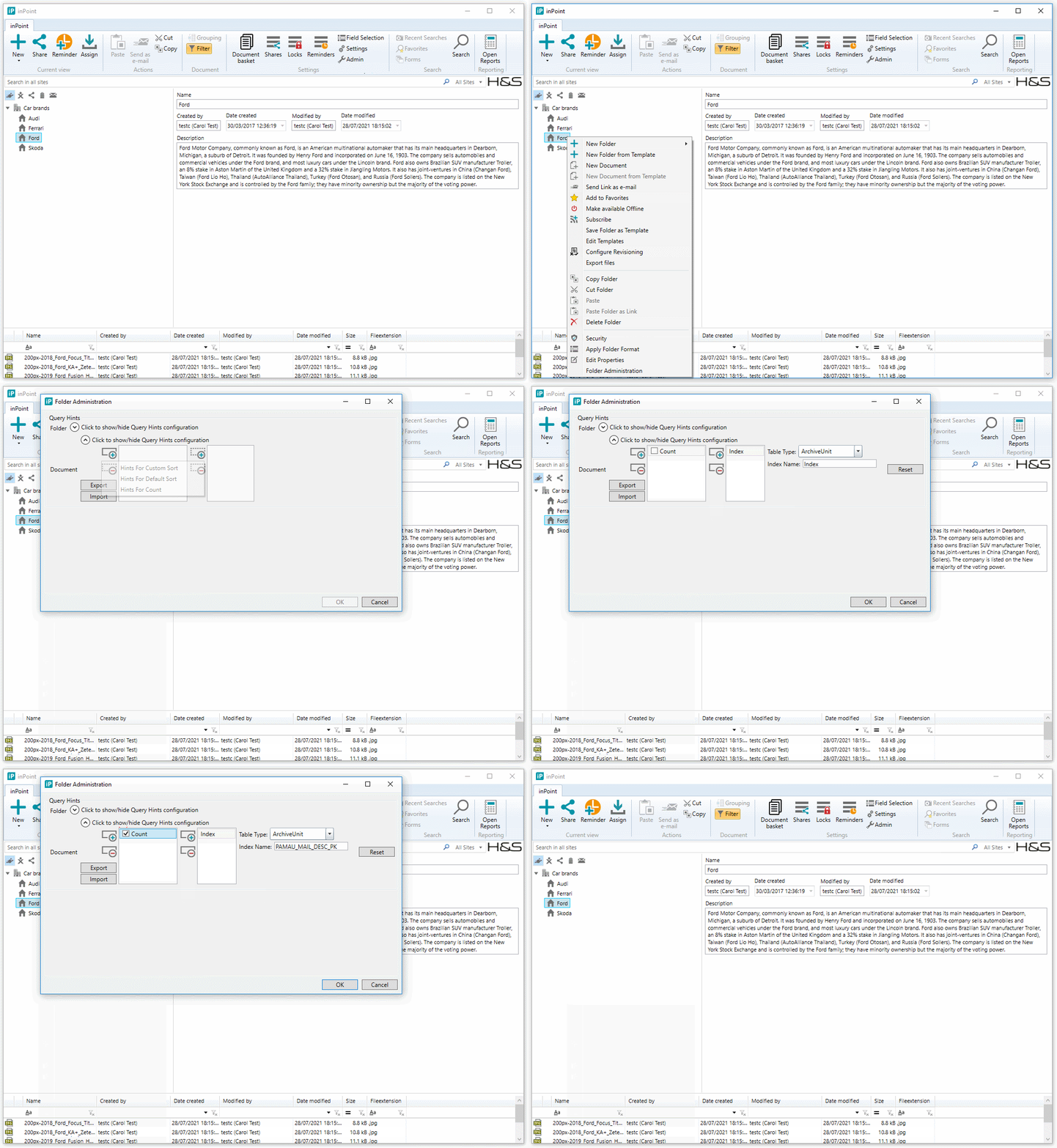
You can of course add as many custom hints settings as its required based on custom sorts for example.
Applying the INDEX table hint using the custom PowerShell script
Open the 'Configure_DBSearchHintsSettings.ps1' custom PowerShell script in the Windows PowerShell Integrated Scripting Environment (ISE). This script is creating a list of hints for the document search SQL statements for the given ItemURI.
The hints can be configured for:
- document search SQL statements for getting the document list
- configurable by the sorted column
- document search SQL statements for getting the document count
The hints settings are stored in the IP_SETTINGS table in JSON format which is compressed with GZip and converted to Base64.
- on errors, the hints settings are not stored in the IP_SETTINGS table and the script exits with exit code 1
- on success, the script exits with exit code 0
It's allowed to modify only the following methods:
-
BuildCustomHintsSettings
Function for building the custom hints settings for the given item URI -
DeleteCustomHintsSettings
Function for deleting the custom hints settings for the given item URI
It's allowed to set the $customItemUri variable only in one method, depending on if you want to set or delete the hints settings.
Let's start to build the INDEX table hint to the custom hints settings for the given item URI.
First you need to set the item URI in the BuildCustomHintsSettings function. Add the following line.
$customItemUri = New-Object Pam.Unify.CommonItemURI.ItemURI ('pam-item://hierarchy=11@path=42$8\,43$5\,44$6\,45$9')
Create the Index hint object with specifying the:
QueryTableType
In our case it's[inPoint.Common.Hints.QueryTableType]::ArchiveUnit, because we added theIndexhint to theDESCtable.- Index name
In our case it'sIX_MAIL_RCD
$myHint = New-Object inPoint.Common.Hints.Index([inPoint.Common.Hints.QueryTableType]::ArchiveUnit, "IX_MAIL_RCD")
Add the Index hint object to the hints settings collection by calling the following function:
# Hint for the document search SQL statements for getting the document list using the default sort
AddHintsSettingsForSort -hint $myHint -sortedColumn $null
At this point, the code of the BuildCustomHintsSettings function is like the code below:
# Function for building the custom hints settings
function BuildCustomHintsSettings()
{
    $customItemUri = New-Object Pam.Unify.CommonItemURI.ItemURI ('pam-item://hierarchy=11@path=42$8\,43$5\,44$6\,45$9')

    $myHint = New-Object inPoint.Common.Hints.Index([inPoint.Common.Hints.QueryTableType]::ArchiveUnit, "IX_MAIL_RCD")

    # Hint for the document search SQL statements for getting the document list using the default sort
    AddHintsSettingsForSort -hint $myHint -sortedColumn $null

    return $customItemUri
}
In our example we found the slow query for the document search SQL statements for getting the document list.
In the case you'll need to add custom hint for document search SQL statements for getting the document count as well, then you need to
add another Index hint object to the hints settings collection, because while getting the count the order by is always by the DOCID column.
The Index name in this case is PAMAU_MAIL_DESC_PK because this index contains the DOCID column.
Add the following code snippet to the BuildCustomHintsSettings function:
$myHint = New-Object inPoint.Common.Hints.Index([inPoint.Common.Hints.QueryTableType]::ArchiveUnit, "PAMAU_MAIL_DESC_PK")

# Hint for the document search SQL statements for getting the document count
AddHintsSettingsForCount -hint $myHint
After these changes, the BuildCustomHintsSettings function will be the following:
# Function for building the custom hints settings
function BuildCustomHintsSettings()
{
    $customItemUri = New-Object Pam.Unify.CommonItemURI.ItemURI ('pam-item://hierarchy=11@path=42$8\,43$5\,44$6\,45$9')

    $myHint = New-Object inPoint.Common.Hints.Index([inPoint.Common.Hints.QueryTableType]::ArchiveUnit, "IX_MAIL_RCD")

    # Hint for the document search SQL statements for getting the document list using the default sort
    AddHintsSettingsForSort -hint $myHint -sortedColumn $null

    $myHint = New-Object inPoint.Common.Hints.Index([inPoint.Common.Hints.QueryTableType]::ArchiveUnit, "PAMAU_MAIL_DESC_PK")

    # Hint for the document search SQL statements for getting the document count
    AddHintsSettingsForCount -hint $myHint

    return $customItemUri
}
You can of course add as many custom hints settings as its required based on custom sorts for example.
After executing the 'Configure_DBSearchHintsSettings.ps1' custom PowerShell script you will get the following output:
VERBOSE: Starting the custom tool for configuring DB search hints settings...
VERBOSE: Building custom hints settings...
VERBOSE: Custom hints settings were specified for item URI:'pam-item://hierarchy=11@path=42$8\,43$5\,44$6\,45$9'
VERBOSE: Saving custom hints settings
VERBOSE: Custom hints settings with id:'4543' have been created.
VERBOSE: DONE.
Next try: Using the OPTIMIZE FOR query hint in the query statement
If the INDEX table hint didn't improve the performance, then we recommend to try the OPTIMIZE FOR query hint as next try.
Add the OPTION (OPTIMIZE FOR (@ID = 9)) clause to the end of the select statement, see below. @ID = 9, because in the variable declaration it's set to value 9.
You need to adapt it to your case.
Example:
DECLARE @L49_DOCSYSTYPE1 INT = 0;
DECLARE @RIGHT_IDD INT = 27;
DECLARE @USER_ID INT = 10;
DECLARE @PAMWORLD_GROUP_ID INT = 3;
DECLARE @ID INT = 9;

SELECT *
FROM   (SELECT L49.*,
               D49.deleted,
               Row_number()
                 OVER (
                   ORDER BY L49.receiveddate DESC) AS ROWNUMBER
        FROM   pam.mailbox_doclink D49
               INNER JOIN pam.pamau_mail_desc L49
                       ON L49.docid = D49.docid
        WHERE  D49.id = @ID
               AND ( D49.deleted IS NULL )
               AND ( L49.docsystype >= @L49_DOCSYSTYPE1 )) T
WHERE  rownumber >= 1
       AND rownumber <= 111
ORDER  BY rownumber ASC
OPTION (OPTIMIZE FOR (@ID = 9))
Try to execute the query statement after applying the OPTIMIZE FOR query hint. If the performance is acceptable (less than 1-2 seconds) then add the OPTIMIZE FOR query hint setting
for the given item URI by using the 'Configure_DBSearchHintsSettings.ps1' custom PowerShell script included in the
inPoint_Tools_\<version>_<suffix>.zip. Example see below.
Applying the OPTIMIZE FOR query hint using the inPoint.Client
Create the OPTIMIZE FOR hint for the default sort with specifying the:
-
ColumnNames
List of column names which are limited by the corresponding variable names. In our case always use theIDcolumn from theLINKtable.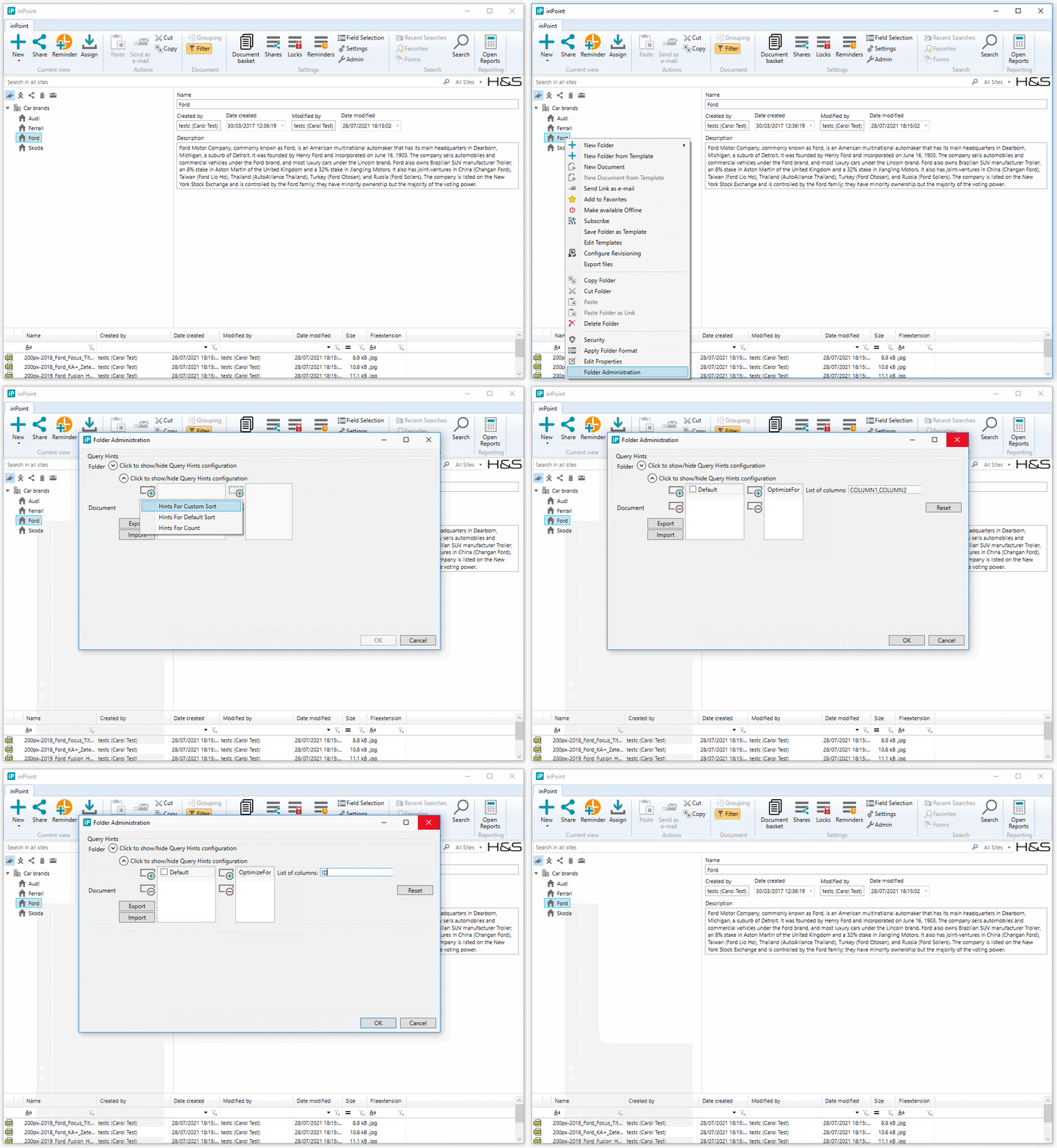
Applying the OPTIMIZE FOR query hint using the custom PowerShell script
First you need to set the item URI in the BuildCustomHintsSettings function. Add the following line.
$customItemUri = New-Object Pam.Unify.CommonItemURI.ItemURI ('pam-item://hierarchy=11@path=42$8\,43$5\,44$6\,45$9')
Create the OPTIMIZE FOR hint object with specifying the:
ColumnNames
List of column names which are limited by the corresponding variable names. In our case always use theIDcolumn from theLINKtable.
$columnNames = New-Object System.Collections.Generic.List[string]
$columnNames.Add("ID")
$myHint = New-Object inPoint.Common.Hints.OptimizeFor $columnNames
Add the OPTIMIZE FOR hint object to the hints settings collection by calling the following function:
# Hint for the document search SQL statements for getting the document list using the default sort
AddHintsSettingsForSort -hint $myHint -sortedColumn $null
At this point, the code of the BuildCustomHintsSettings function is like the code below:
# Function for building the custom hints settings
function BuildCustomHintsSettings()
{
    $customItemUri = New-Object Pam.Unify.CommonItemURI.ItemURI ('pam-item://hierarchy=11@path=42$8\,43$5\,44$6\,45$9')

    $columnNames = New-Object System.Collections.Generic.List[string]
    $columnNames.Add("ID")
    $myHint = New-Object inPoint.Common.Hints.OptimizeFor $columnNames

    # Hint for the document search SQL statements for getting the document list using the default sort
    AddHintsSettingsForSort -hint $myHint -sortedColumn $null

    return $customItemUri
}
Next try: Using the RECOMPILE query hint in the query statement
If the OPTIMIZE FOR table hint didn't improve the performance, then we recommend to try the RECOMPILE query hint as next try.
Add the OPTION (RECOMPILE) clause to the end of the select statement, see below.
Example:
DECLARE @L49_DOCSYSTYPE1 INT = 0;
DECLARE @RIGHT_IDD INT = 27;
DECLARE @USER_ID INT = 10;
DECLARE @PAMWORLD_GROUP_ID INT = 3;
DECLARE @ID INT = 9;

SELECT *
FROM   (SELECT L49.*,
               D49.deleted,
               Row_number()
                 OVER (
                   ORDER BY L49.receiveddate DESC) AS ROWNUMBER
        FROM   pam.mailbox_doclink D49
               INNER JOIN pam.pamau_mail_desc L49
                       ON L49.docid = D49.docid
        WHERE  D49.id = @ID
               AND ( D49.deleted IS NULL )
               AND ( L49.docsystype >= @L49_DOCSYSTYPE1 )) T
WHERE  rownumber >= 1
       AND rownumber <= 111
ORDER  BY rownumber ASC
OPTION (RECOMPILE)
Try to execute the query statement after applying the RECOMPILE query hint. If the performance is acceptable (less than 1-2 seconds) then add the RECOMPILE query hint setting
for the given item URI by using the 'Configure_DBSearchHintsSettings.ps1' custom PowerShell script included in the
inPoint_Tools_\<version>_<suffix>.zip. Example see below.
Applying the RECOMPILE query hint using the inPoint.Client
Create the RECOMPILE hint for the default sort.
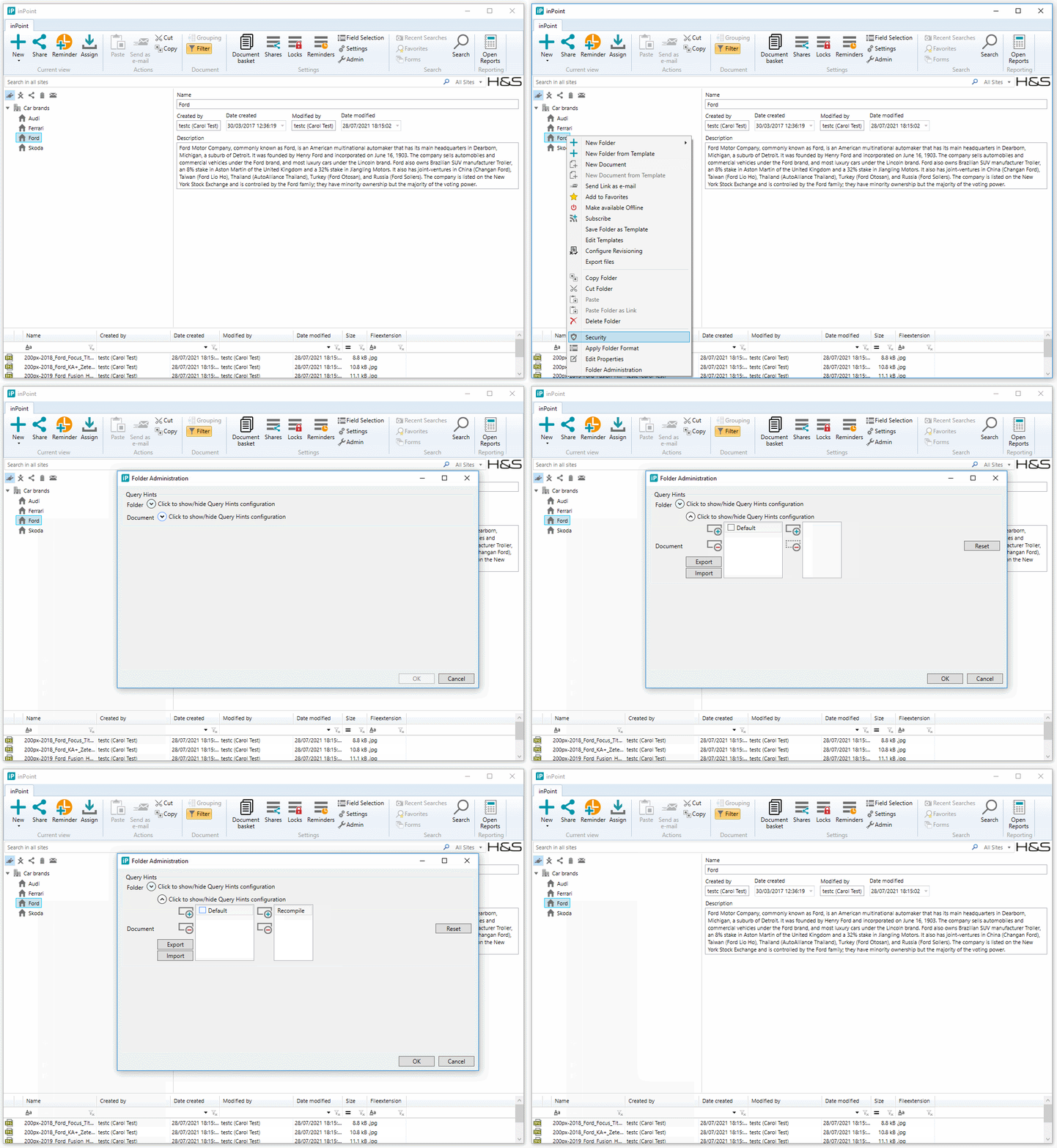
Applying the RECOMPILE query hint using the custom PowerShell script
First you need to set the item URI in the BuildCustomHintsSettings function. Add the following line.
$customItemUri = New-Object Pam.Unify.CommonItemURI.ItemURI ('pam-item://hierarchy=11@path=42$8\,43$5\,44$6\,45$9')
Create the RECOMPILE hint object:
$myHint = New-Object inPoint.Common.Hints.Recompile
Add the RECOMPILE hint object to the hints settings collection by calling the following function:
# Hint for the document search SQL statements for getting the document list using the default sort
AddHintsSettingsForSort -hint $myHint -sortedColumn $null
At this point, the code of the BuildCustomHintsSettings function is like the code below:
# Function for building the custom hints settings
function BuildCustomHintsSettings()
{
    $customItemUri = New-Object Pam.Unify.CommonItemURI.ItemURI ('pam-item://hierarchy=11@path=42$8\,43$5\,44$6\,45$9')

    $myHint = New-Object inPoint.Common.Hints.Recompile

    # Hint for the document search SQL statements for getting the document list using the default sort
    AddHintsSettingsForSort -hint $myHint -sortedColumn $null

    return $customItemUri
}
Next tries: ...
Feel free to use any hint supported by inPoint with any combination...
Enabling the configured hints in inPoint
The hints are cached on demand. In the case the hints were configured using the custom PowerShell script, you need to restart the Pam.Web application pool in IIS on the inPoint.Server, in order to apply the latest hints settings.
Deleting the hint settings using the custom PowerShell script
Open the 'Configure_DBSearchHintsSettings.ps1' custom PowerShell script in the Windows PowerShell Integrated Scripting Environment (ISE). With this script you can also delete the hint settings for the document search SQL statements for the given ItemURI.
In this case you need to modify the following method:
DeleteCustomHintsSettings
Function for deleting the custom hints settings for the given item URI
First you need to set the item URI in the DeleteCustomHintsSettings function. Add the following line.
$customItemUri = New-Object Pam.Unify.CommonItemURI.ItemURI ('pam-item://hierarchy=11@path=42$8\,43$5\,44$6\,45$9')
At this point, the code of the DeleteCustomHintsSettings function is like the code below:
# Function for deleting the custom hints settings
function DeleteCustomHintsSettings()
{
    $customItemUri = $null

    $customItemUri = New-Object Pam.Unify.CommonItemURI.ItemURI ('pam-item://hierarchy=11@path=42$8\,43$5\,44$6\,45$9')

    return $customItemUri
}
After executing the 'Configure_DBSearchHintsSettings.ps1' custom PowerShell script you will get the following output:
VERBOSE: Starting the custom tool for configuring DB search hints settings...
VERBOSE: Deleting hints settings for item URI:'pam-item://hierarchy=11@path=42$8\,43$5\,44$6\,45$9'
VERBOSE: Hints settings were successfully deleted for item URI:'pam-item://hierarchy=11@path=42$8\,43$5\,44$6\,45$9'
VERBOSE: DONE.
In order to apply the changes in inPoint you need to restart the Pam.Web application pool in IIS on the inPoint.Server.