Fulltext Search Index Migration
Verify the version of all indexes
Upgrade of ElastisSearch to version 7.x is only possible if all indexes are at least version 6.0.
Use Kibana to execute this:
GET _settings/*.version.created*?pretty&human
or if not possible, use your browser directly (adapt port and server name as appropriate)
http://servername:9200/_settings/*.version.created*?pretty&human
The result will list all indexes and their version, in this example the index called "inpoint" is too old and needs to be update before the installation.
  ".tasks" : {
    "settings" : {
      "index" : {
        "version" : {
          "created_string" : "6.0.1",
          "created" : "6000199"
        }
      }
    }
  },
  "inpoint" : {
    "settings" : {
      "index" : {
        "version" : {
          "created_string" : "5.4.2",
          "created" : "5040200"
        }
      }
    }
  },
  ".monitoring-es-6-2019.12.07" : {
    "settings" : {
      "index" : {
        "version" : {
          "created_string" : "6.4.3",
          "created" : "6040399"
        }
      }
    }
  }
Upgrade system indexes
Important!
This is only possible and required in version 6.* of ElasticSearch!
For later versions wait until version 7.17.4 and use Kibana and go to 'Stack Management' and 'Upgrade Assistant' for updating the system indexes. It's possible to delete the index and let the system create it automatically next time. No inPoint data is lost, but you loose all your Kibana settings (indexes, graphs, dashboards) and monitoring information.
Execute this command in Kibana, it will return all system indexes where an automated upgrade can be done
GET /_xpack/migration/assistance
For each index listed here, execute the next command (please note that all names are in lower case).
POST /_xpack/migration/upgrade/<index_name>
Delete unused indexes
All indexes which are not longer in use, can be deleted. This can includes old logs from Kibana which are not needed any more. It's possible to drop the system indexes e.g. '.tasks' or '.kibana' without loosing critical data, of course monitoring information or the settings in Kibana are lost.
DELETE <index_name>
Migrate inPoint indexes
There are two ways of migrating, either directly on the machine or by creating a new machine and migrating remotely. In all cases a new copy of the old index is created. This means that the size of the index is at least doubled.
Because of the large amount of data accessed during the migration the server might reach high RAM and CPU usage which can cause other processes to fail. See the troubleshooting how to limit the memory usage.
Create a new empty index
Create the new index with the currently installed indexer. Open a command line in the installation directory of inPoint.Indexer (default is: C:\Program Files (x86)\HS Europe\inPoint.Indexer) and write the script creation commands into a file.
inPoint.Indexer.exe CREATEINDEX /IndexName inpoint20220501 /Analyzer inPoint_DE_EN > C:\Temp\index.txt
/IndexName:
Use a meaningful name for the index, it's recommended to use an alias for it later.
/Analyzer:
The default is "inPoint_DE_EN", but all analyzers supported by ElasticSearch are allowed here. See also the 'Text Analyze' topic in the documentation to choose the right analyzer for your use cases!
The script for creating the index is now saved in C:\Temp\index.txt, this includes three commands which have to be executed in Kibana in the next step.
Execute the first command:
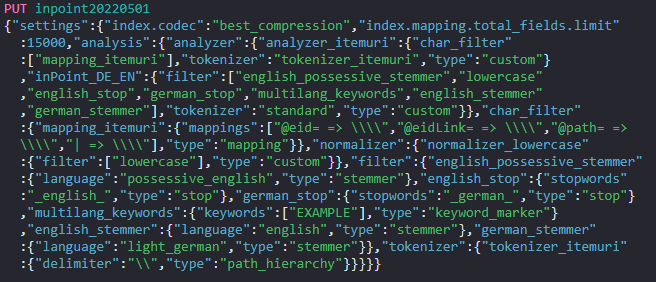
Which will return this success message:

Then execute the second command.
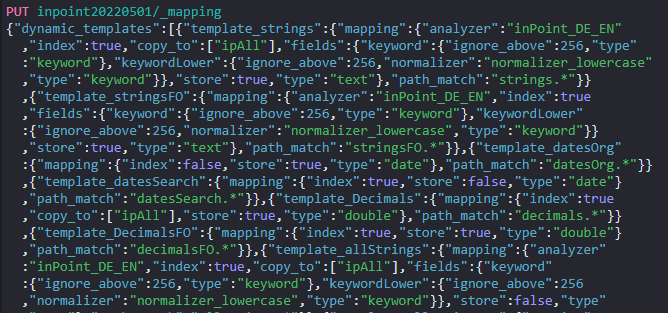
Which will return this success message:

Then execute the third command.
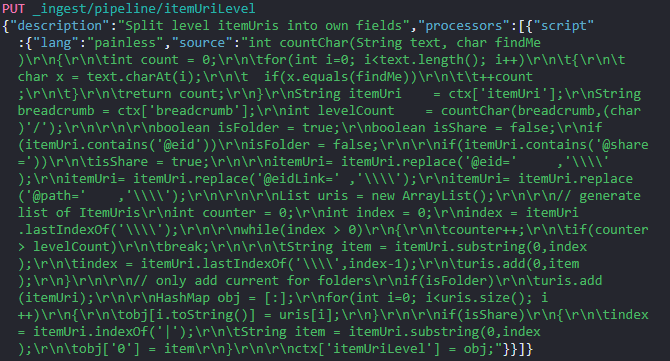
Which will return this success message:
The new empty index is now created and can be filled in the next step.
Migrate the data into the new index (local)
Use "Kibana" to write the index from old into new using the reindex api. Make sure that the server has enough disk space, the size of the index will doubled.
If the migration updates an index from a version after 2022.1 then the part with "pipeline": "itemUriLevel" can be omitted, that is the case when the
command described here returns zero total hits.
Example
POST _reindex?wait_for_completion=false
{
  "source": {
    "index": "inpoint"
  },
  "dest": {
    "index": "inpoint20220501",
    "pipeline": "itemUriLevel"
  }
}
This will return a result similar to this: Using the ID from here it's possible to monitor or even cancel the task and resume the process later.
{
  "task" : "PPjiQHIMTIW-OaSQshLYaw:4567"
}
Migrate the data into the new index (remote)
Use "Kibana" to write the index from old into new using the remote reindex api. Make sure that the server has enough disk space, the size of the new index will be roughly the same size as the old index.
Enable the new server to read from your old cluster by adding your old cluster to the reindex.remote.whitelist in elasticsearch.yml:
elasticsearch-7-4-2-upgrade-index-migrate-elasticsearch.yml.png
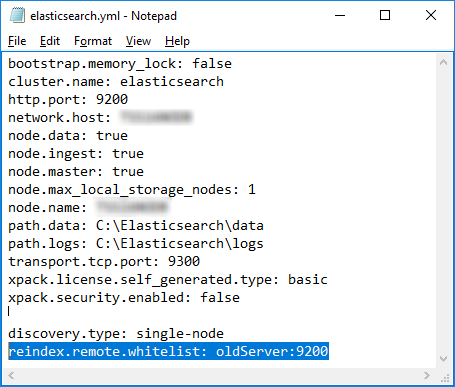
Add this setting:
reindex.remote.whitelist: oldServer:9200
After that you need to restart the service of ElasticSearch (e.g on the commandline):
net stop elasticsearch
net start elasticsearch
After the new cluster is up and running again, execute this statement in Kibana to start the migration.
If the migration updates an index from a version after 2022.1 then the part with "pipeline": "itemUriLevel" can be omitted, that is the case when the
command described here returns zero total hits.
"source":
This defines the old index and how the server can connect to it.
"dest":
This is the name of the new index, which was created in the previous step.
Example
POST _reindex?wait_for_completion=false
{
  "source": {
    "remote": {
      "host": "http://oldServer:9200",
      "username": "user",
      "password": "pass"
    },
    "index": "inpoint"
  },
  "dest": {
    "index": "inpoint20220501",
    "pipeline": "itemUriLevel"
  }
}
This will return a result similar to this: Using the ID from here it's possible to monitor or even cancel the task and resume the process later. The monitoring is the same as for the local migration, but keep in mind to execute the document size on the old server.
{
  "task" : "PPjiQHIMTIW-OaSQshLYaw:4567"
}
Monitoring the migration
Use the task-api to check the process or check the size and document count of the new index.
State of the current task
Get the state of the task using the task api.
Kibana
GET /_tasks/PPjiQHIMTIW-OaSQshLYaw:4567
Browser
http://<server name>:9200/_tasks/PPjiQHIMTIW-OaSQshLYaw:4567?pretty
Verify document count of the old and new index
Kibana
(enter the correct name of the indexes, in the case of an remote migration the first statement needs to be executed on the old server)
GET /inpoint/_count
GET /inpoint20220501/_count
Browser
(enter the correct name of the server and of the indexes, in the case of an remote migration the first statement needs to be executed on the old server)
http://<server name>:9200/inpoint/_count
http://<server name>:9200/inpoint20220501/_count
Cancel the task
POST /_tasks/PPjiQHIMTIW-OaSQshLYaw:4567/_cancel
After cancelling the task you can either delete the index and start from scratch or resume the operation.
Resume and skip alread processed documents
Using the settings "op_type" : "create" and "conflicts": "proceed" it's possible to resume a cancelled migration.
Note
Skipping of existing documents is not for free because the data needs to be fetched and compared on both sides!
POST _reindex?wait_for_completion=false
{
  "conflicts": "proceed",
  "source": {
    "index": "inpoint"
  },
  "dest": {
    "index": "inpoint20220509",
    "pipeline": "itemUriLevel",
    "op_type" : "create"
  }
}
Delete the old index
Execute this in kibana, make sure that the migration has finished.
DELETE <index_name>
Create an Alias
An alias is useful to split between the logical name and the physical name.
Here a new alias is created, so that the index inpoint20220501 can be accessed as inpoint.
POST /_aliases
{
    "actions" : [
        { "add" : { "index" : "inpoint20220501", "alias" : "inpoint" } }
    ]
}
Now you can continue with the upgrade to 7.7.1 or higher!
Upgrade inPoint Index older than 2022.1
During the upgrade of inPoint the installation may point out that the index needs to be upgraded.
There are two ways of upgrade:
- Inplace adding of the new fields
- migrate into a new index (this will also upgrade to the new improved highlighting method)
Info
inPoint can be used without the upgrade, but the search favorites will not show previously archived documents or folders. It is possible to use inPoint while the upgrade is running in the background.
Verify that the update is needed
Check if the index needs to be upgraded by executing this command in Kibana. Verify the result of "hits" and the value of "total", this states how many documents needs to be upgraded.
POST /inpoint/_search
{
  "size": 0,
  "track_total_hits": true,
  "query": {
    "bool": {
      "must_not": [
        {
          "exists": {
            "field": "itemUriLevel.0"
          }
        }
      ]
    }
  }
}
In this example the update is needed, because there are '12.482.955' documents not updated.
{
  "took" : 1184,
  "timed_out" : false,
  "_shards" : {
    "total" : 39,
    "successful" : 39,
    "skipped" : 0,
    "failed" : 0
  },
  "hits" : {
    "total" : {
      "value" : 12482955,
      "relation" : "eq"
    },
    "max_score" : null,
    "hits" : [ ]
  }
}
Inplace Upgrade
The index upgrade is executed using an update by query. The upgrade will search for all entries with the missing fields and add them by executing a pre-defined pipeline.
Because of the large amount of data accessed during the upgrade the server might reach high RAM and CPU usage which can cause other processes to fail. See the troubleshooting how to limit the memory usage.
Start the update as background task
Execute an upgrade-by-query task in Kibana:
slices
The last parameter in the URL configures ElasticSearch to parallelize the update process. If ommitted the value will be the same as "1", to let ElasticSearch take full control use the value 'auto'.
Warning
Using 'auto' may eat up all available CPU and memory resources!
pipeline=itemUriLevel
This is the important part how each document is processed during the update (do not use a different value than 'itemUriLevel')!
POST /inpoint/_update_by_query?conflicts=proceed&pipeline=itemUriLevel&wait_for_completion=false&slices=2
{
  "query": {
    "bool": {
      "must_not": [
        {
          "exists": {
            "field": "itemUriLevel.0"
          }
        }
      ]
    }
  }
}
This will return a result similar to this: Using the ID from here it's possible to monitor or even cancel the task.
{
  "task" : "PPjiQHIMTIW-OaSQshLYaw:41981233"
}
Monitoring
The current progress can be checked by executing same command as checking if the upgrade is needed.
POST /inpoint/_search
{
  "size": 0,
  "track_total_hits": true,
  "query": {
    "bool": {
      "must_not": [
        {
          "exists": {
            "field": "itemUriLevel.0"
          }
        }
      ]
    }
  }
}
It's also possible to check the task itself, but returned number of updated documents is only correct, when using 'slices=1' because if using more, there will be an equal number of sub tasks. Get the single update task:
GET /_tasks/PPjiQHIMTIW-OaSQshLYaw:41981233
Get all executing updates:
GET _tasks?detailed=true&actions=*byquery
Cancelleing
If the command uses too much CPU, RAM or Disk it can be cancelled at any moment and the restart will skip already processed documents.
POST _tasks/PPjiQHIMTIW-OaSQshLYaw:41981233/_cancel
Migrate to a new Index
This will use the re-index api to copy the values from an old index to a new created index similar to the migration
described above. Similar to the update-by-query in the inplace upgrade the pre-defined pipeline itemUriLevel must be used for transforming the documents.