Configuration
The configuration of Retention must be done on several places.
HybridStore
HybridStore is the lowest point where retention-times can be configured. For each location you can configure if the underlying hardware should and can also support retention-times.
Currently these hardware support enforcing of retention-times.
- Amazon S3 (with Object Lock enabled)
- Dell EMC ECS, Celerra (with File-Level Retention), Centera
- FAST LTA "Silent Cube" and "Silent Brick"
- IBM Tivoli
- NetApp (with Snaplock)
- compatible hardware which support Last-Access-Date as Retention-Date (similar to Celerra, NetApp Snaplock,...)
When configuring a HybridStore-Scheme it's possible to define a minimum number of retention days, which will be used for each stored file. This will silently increase the retention date if the date provided to HybridStore is too short.
Single-Instance and Retention time
If the same file is archived again the single-instance feature of HybridStore will detect it and it will not store the file again on the hardware. If the hardware supports it, the retention time of the physical file will be increased as needed.
HybridStore-API
If directly programming with the HybridStore-API it's possible to define a retention date on each archived file (see the RetentionDate argument in the WriteFile command).
Issues with Hardware Only
It's not recommended to configure only the underlying hardware for retention times and not configuring it in HybridStore as well. This means, that HybridStore would only recognize an error, if it tries to delete the physical file from the disk or the storage system.
Issue with Delete and Single Instance
If files are stored only once because of single instance this means that any copy of a file can be deleted, except the last one, even if the files where stored from totally different places.
- An important document is stored (e.g. a side letter to a customer contract)
- The same document is stored again (e.g. the same side letter is used with a different customer)
- The first archived document can be deleted at any time, because as long as there are logical copies, the physical file on the storage system is not deleted.
Issues with increasing the Retention-Time
If the same file is stored again, HybridStore can also not increase the retention time on the hardware as required.
- A file is stored at the beginning of the year. e.g. 2019-01-01, the hardware automatically uses one year as retention date and protects the file until 2020-01-01.
- The same file is stored at the end of the year. e.g. 2019-12-31. The single-instance checks finds the file and does not store it again. The already stored file is only protected ONE DAY instead of ONE YEAR.
inPoint
These setting are the default when archiving or changing a document but they can be overwritten by custom plugins or when directly using the official API.
Define per Archive-Unit
For each archive unit it's possible to define a retention time in months. It can be either configured as a fixed default value or calculated from the document property by using an database command.
Refer to inPoint.Admin documentation for this feature (see here how it's configured for a new archive unit).
Define per Global Site
In the Standalone Client, when you configure a global site. It's possible in the Storage tab to override the setting per Archive-Unit and use the retention from here.
This setting is only used when a document is archived with inPoint.Client or inPoint.Web.
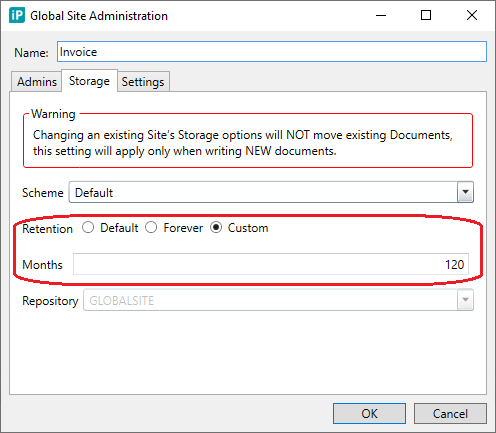
- Default: do not override the retention setting from the archive unit
- Forever: the protection of the file will never expire
- Custom: protect the file any number on months from the time of the last write. (choose "0" for not protecting it)