🏴 Known Issues
This list includes all pending known issues not yet resolved.
[3 - Medium] Add new document: the DocList is not refreshed
Description
Internal: see TFS [#78718]
Sometimes when adding new documents in inPoint.Standalone the document list is not refreshed.
Workaround
Internal: see TFS [#78718]
Select another folder and back to update the list of documents or restart the client.
[3 - Medium] OutlookAddIn/Settings: Requires a restart of the client to get back online when switching environments
Description
Internal: see TFS [#79316]
When switching environments in the Outlook-AddIn and the environments is offline first and then only later becomes online or when switching from an offline environment to an online environment the client inside of Outlook will not fully change the menu and icon to online.
Workaround
Internal: see TFS [#79316]
Restart Outlook to resolve this issue.
[3 - Medium] inPoint.Core: Swagger ignores fields in CreateDocument
Description
Internal: see TFS [#79759]
The swagger page using "POST /api/v2/docs upload a new Document" sends the "fields" parameter so that it's not recognized on the server side. All the parameters must be in one "multipart/form-data" content called fields.
Workaround
Internal: see TFS [#79759]
As a workaround it's possible to add a comment into the json body which will force "swagger" to use one "multipart-/form-data" content without splitting it.
Example:
Creating a document and setting two properties, "Type" and "State".

The resulting request will have a body similar to this, the body contains all properties in "fields".

Without the workaround, the request will look like this. The properties are added as own form-data entry.
(and not inside a property called "fields")

[3 - Medium] Canonical ACL error during upgrade from 2024.3 to 2025.3
Internal: see OTRS [2026030101000022]
### Description
Internal: see TFS [#81506]
On some systems the setup may fail when setting folder permissions for IIS APPPOOL\Pam.Web.
This happens if the existing NTFS permissions of a folder are not in canonical order. In this state Windows does not allow modifications to the ACL and the setup may stop with the error:
“This access control list is not in canonical form and therefore cannot be modified.”
This issue is not caused by the setup itself, but by already incorrectly ordered Windows folder permissions.
In future versions the setup wizard will detect this situation and show a Retry dialog.
This will allow the user to fix the folder permissions manually and then retry the operation directly from the wizard without restarting the setup.
Workaround
Internal: see TFS [#81506]
Reset the folder permissions and grant the required rights manually:
After fixing the permissions, run the setup again.
icacls "<folder>" /reset /T /C
icacls "<folder>" /grant "IIS APPPOOL\Pam.Web:(OI)(CI)F" /T
[3 - Medium] inPoint.Wizard (Upgrade to 2025.3): (014_00_ItemNotesSplit.ps1) There is already an open DataReader associated with this Command
Description
Internal: see TFS [#81596]
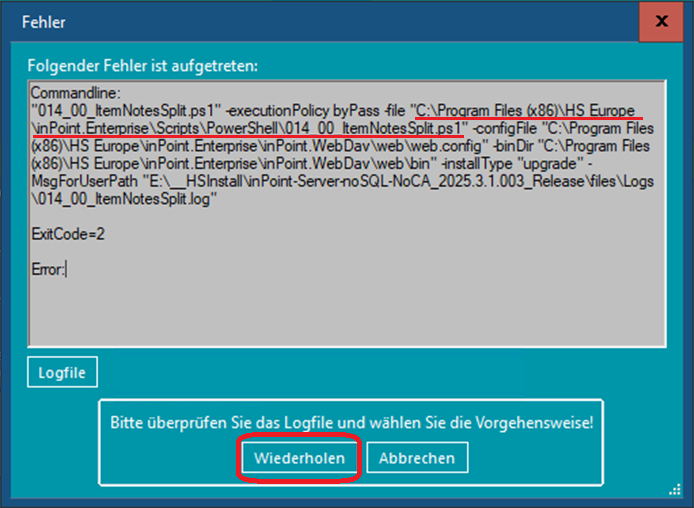
During the installation with the wizard a pop-up complains that the script "014_00_ItemNotesSplit.ps1" has an issue with an already open data reader.
"There is already an open DataReader associated with this Command which must be closed first."
Workaround
Internal: see TFS [#81596]
The wizard allows you to retry the command.
Locate the script in the installation directory. The default path is "C:\Program Files (x86)\HS Europe\inPoint.Enterprise\Scripts\PowerShell\014_00_ItemNotesSplit.ps1"
(the full current path is also written in the error message)
Go to line number 237 and add the following line which is also shown in green in the snippet:
if ($null -ne $reader) \{ $reader.Dispose(); $reader = $null; \}
if ($null -ne $reader) \{ $reader.Dispose(); $reader = $null; \}
        finally
        \{
            if($tran -ne $null) \{$tran.Dispose()\}
        \}
    \}
    if ($null -ne $reader) \{ $reader.Dispose(); $reader = $null; \}
    if($anyError -eq $false)
    \{
        if($dbConn.DatabaseMode -eq [Pam.DB.DbMode]::Default  -or $dbConn.DatabaseMode -eq [Pam.DB.DbMode]::NotSet)
        \{
After that, click on retry in the wizard!
- [#81871] [2 - High] Inconsistent DateTime handling with Reminders