Troubleshooting
Tools for Troubleshooting
HybridStore Tester
The testing application for HybridStore is in the same directory as the service.
HybridStoreTester.exe
The tester tries to keep all informations about the last used server, but for the first start you need to enter a valid URL, if the default is not correct, and a valid tenant or user id!
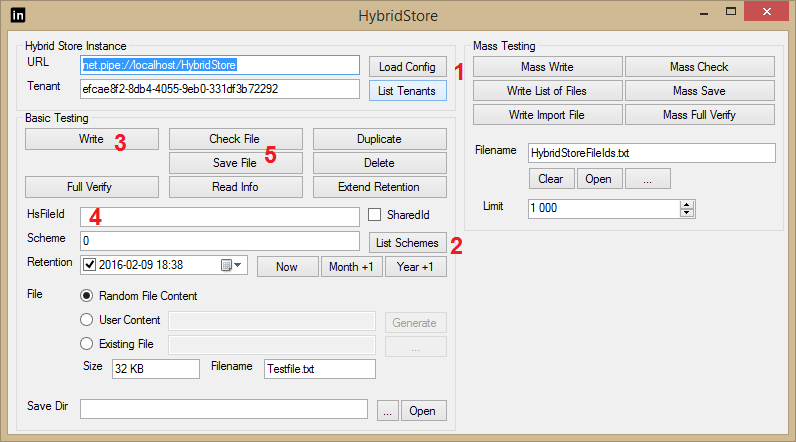
In this case, the URL and the Tenant are configured by hand. If not sure
click Load Config (1) after choosing the config-file of the services,
you get a list of all valid urls. Only after doing that,
the button List Tenants will show you a list of the tenants, click on
the one you want to use!
With List Schemes (2) you get a list of all configured schemes, select one or double click to choose one.
With Write (3) a dummy file will be stored, you get a summary about
the storing and the resulting id
will be in the textbox HsFileId (4).
To test a file you can click on of the three buttons at (5), Check Files will only read the file, but not save it, Save File will save it into a temp directory, Read Info will give only metadata about the file, but will not access its content!
The "Full Verify" button will check a file in all places it saved and will give a status message for each place.
Logging
HybridStore uses log4net for logging (the default is to log only warnings and errors). The default config-file is placed in "C:\Program Files (x86)\HS Europe\HS_log4Net.config"
and the logs are written to c:\temp\HybridStore.log.
For more details about log4net read the more detailed documentation.
Locations
Invalid certificate for S3 location
If accessing the S3 location fails with the following error:
AuthenticationException: The remote certificate is invalid according to the validation procedure.
The most common reason is that the certificate itself or an parent certificate is not trusted. The solution is to import the certificate into the "Personal" or to import the parent into the "Trusted Root Certification Authorities" of the machine certificates. (using Manage computer certificates or short certlm.msc)
On of the reasons could be that the URL to S3 uses a wildcard certificate which only secures a single level of subdomain which maybe does not include the bucket.
Example
During access the bucket is included in the request url, which may look like this:
"https://myBucket.myTenant.s3Server.local"
The certificate for "*.s3Server.local" secures one level only. So "myTenant.s3Server.local" is secured but "myBucket.myTenant.s3Server.local" is not.
Solution
There should be a certificate explicitly for the bucket "myBucket.myTenant.s3Server.local" or a wildcard certificate for "*.myTenant.s3Server.local"!
Unable to determine if a bucket exists or if object lock mode is enabled
In case the server gets any of these two errors during startup or during archive (where xxx is the name of the S3 bucket):
Unable to check if the bucket 'xxx' exists!Unable to read the object lock configuration for the bucket 'xxx'
It's possible that the executing of this method is not allowed for the user. If this is the case disable the checks.
Configuration
Upgrade of Configuration
During the upgrade of the inPoint.HybridStore installation the configuration will be upgraded from the old xml format to the new json format. In case there is a problem or a manual upgrade is needed, the following command can be used:
HybridStoreSv.exe /checkConfig /forceMigration
The optional parameter /forceMigration will force the overwriting any previous json configuration file. If the parameter is omitted and a json configuration file already exists it will be merged with the xml configuration.