✨ What's New
This list includes all new major features implemented.
The stored procedure 'SP_PAM_SETFTTRIGGERSTATE' is not called any more
Internal: see TFS [#39869]
In previous version this procedure was called before accessing the database for folder and document data to set a database context with the id of current user, the current language and to disable execution of the trigger for fulltext indexing.
The context for user and language are not used by inPoint and the implementation of the fulltext search is not using triggers anymore. The following database objects/settings are not available anymore:
- PAM_FTTRIGGERSTATE_VIEW view
- SP_PAM_SETFTTRIGGERSTATE stored procedure
- SP_PAM_GETFTTRIGGERSTATE function
- The 'EnableDbContext' settings in the web.config (in the section
pamSettings)
If any custom solution is depending on this behaviour it is possible to use the following function which is called before creating/modifying the folder and document data.
-- The rule evaluation is disabled when modifying the folder or document data from inPoint.
IF (PAM.IP_ISRULEEVALUATIONENABLED() = 0)
BEGIN
    -- your custom code (for example sending a fulltext request when the document is not archived from inPoint ...)
END
Highlighting causes errors on large bodies or very short wildcard searches
Internal: see OTRS [2020112501000027]
Internal: see TFS [#46505]
The content of all documents are now indexed using 'IndexOptions.Offsets' which allows faster highlighting and also allows larger texts. Additionally for all existing indices the search will use the new 'max_analyzed_offset' option which will ignore larger texts instead of generating an error.
Improved memory usage of search favorites showing the result as hierarchy tree
Internal: see OTRS [2020122101000041]
Internal: see TFS [#55638]
The server side implementation was changed to avoid using 'fielddata' in ElasticSearch which used a lot of memory during the search.
Improved inPoint.Core CreateDoc performance
Internal: see OTRS [2021120201000058]
Internal: see TFS [#55678]
With different code improvements in the inPoint.Core backend we improved the overall performance for the Create Document Method by 35%.
We added a new Parameter to the Method called "select". You can pass common names and other fields to the method which you want to be returned.
For mass archiving we recommed passing as select only "$ItemUri", only the ItemUri will be returned and this will speed up the method as well.
Improved some error messages shown when any fulltext search is done in the client
Internal: see TFS [#58713]
ElasticSearch 7.16.3 is now supported and included in the inPoint.Wizard
Internal: see TFS [#58723]
Please check the "fulltext search" area to get more details.
inPoint.Admin / inPoint.Identity: Resend eMail for invitation
Internal: see OTRS [2021041201000063]
Internal: see TFS [#58844]
inPoint.Admin provided the command Reset password and send invitation email
This command was splitted into two commands:
When eMail-Confirmed is cleared and a password is set:
Command with name: Send confirmation email
and if eMail-Confirmed is cleared or no password is set:
Command with name: Reset password
Technically, both commands are doing the same: Reset the password and send out a confirmation email.
Toggle right panel in WebBrowser viewer
Internal: see OTRS [2021092401000031]
Internal: see TFS [#58892]
In the WebBrowser viewer of the Document-Preview between the Save-As button and the Pin-Button of the window a new button was added. this button allows to show/hide the right panel with the notes.
- By default pinned
- Pinned ToolTip: Show Notes
- Unpinned ToolTip: Hide Notes

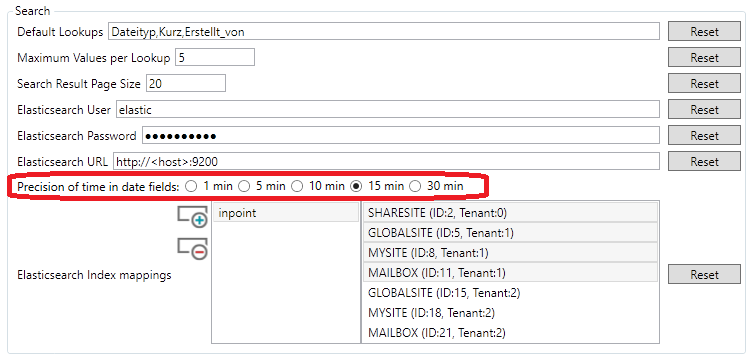
Search: Configure the precision for searches with date and time
Internal: see TFS [#59111]
During indexing the precision of dates (see 'timeResolution')
can be configured. To return
correct results, the same precision has to be configured for the
search as well.
This
applies to all search forms when searching for date fields and using any of
these operators: 'Equal with Time', 'From [...]
with Time', 'To [...]
with Time', 'From [...]
to [...] with Time'.
log4net was upgraded to 2.0.13
Internal: see OTRS [2021111001000053]
Internal: see TFS [#59355]
The log4net version which is use throughout inPoint was upgrade to 2.0.13.
It's recommended to recompile user generated code which uses log4net (directly or indirectly) although assembly binding redirection was added to so that old libraries will use the new version automatically.
inPoint.HybridStore will use virtual-hosted-style URLs for Amazon S3
Internal: see OTRS [2021112801000011]
Internal: see TFS [#59639]
The implementation of the S3 storage location will use 'virtual-hosted-style request' instead of 'path-style-requests' when accessing the server. The old
behaviour can be enabled by the new setting 'ForcePathStyle', see the documentation for more details.
Added batch upload "CreateDocs" method to inPoint.Core API
Internal: see TFS [#59798]
New method called "CreateDocs" was added to the Docs Controller in inPoint.Core.
For more details take a look at the swagger definition for "Docs" => "/api/v1/docs/batch"!
For more details take a look at the swagger definition for "Docs" => "/api/v1/docs/batch"!
Show more details in swagger errors
Internal: see OTRS [2021122901000025]
Internal: see TFS [#59824]
The issue was that in some cases instead of a HTTP-400 a HTTP-500 error was returned. The HTTP-500 has just the message "unknown error" (and writes the details into the log) while the HTTP-400 returns the error details.
For the current version some methods and use-cases where analyzed but the behavior could not be reproduced, So it seems to be already solved.
For the current version some methods and use-cases where analyzed but the behavior could not be reproduced, So it seems to be already solved.
When archiving show the target location
Internal: see OTRS [2022021701000092]
Internal: see TFS [#60538]
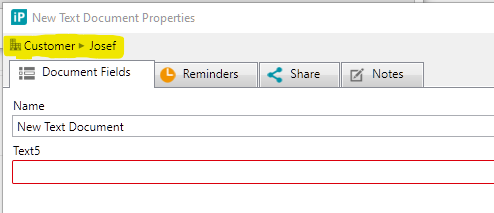
When archiving a new document the classification window shows now the target element.
Check if inPoint.Admin is already running
Internal: see OTRS [2022020701000182]
Internal: see TFS [#60541]
During startup, the inPoint.Admin client now checks for another running inPoint.Admin by the same user.
If so, the user gets a wanrning and has to decide if he really wants to start a new instance.
Changed names in BaseDataProvider
Internal: see TFS [#60999]
Some protected members in inPoint.Client/inPoint.Plugins/Classification/ExtraAttributes/DataProvider/BaseDataProvider where renamed/removed:
protected BaseEditorControl.tokenizer: Removed!
protectee BaseEditorControl.evalCustomFunctions(string): Renamed to EvalCustomFunctions(string)
protected BaseDataProvider.buildSearchValue(string, HierarchyItem, List<ExtraAttributeDefinition>, Dictionary<string, object>): Renamed to BuildSearchValue(string, HierarchyItem, List<ExtraAttributeDefinition>, Dictionary<string, object>)