✨ What's New
This list includes all new major features implemented.
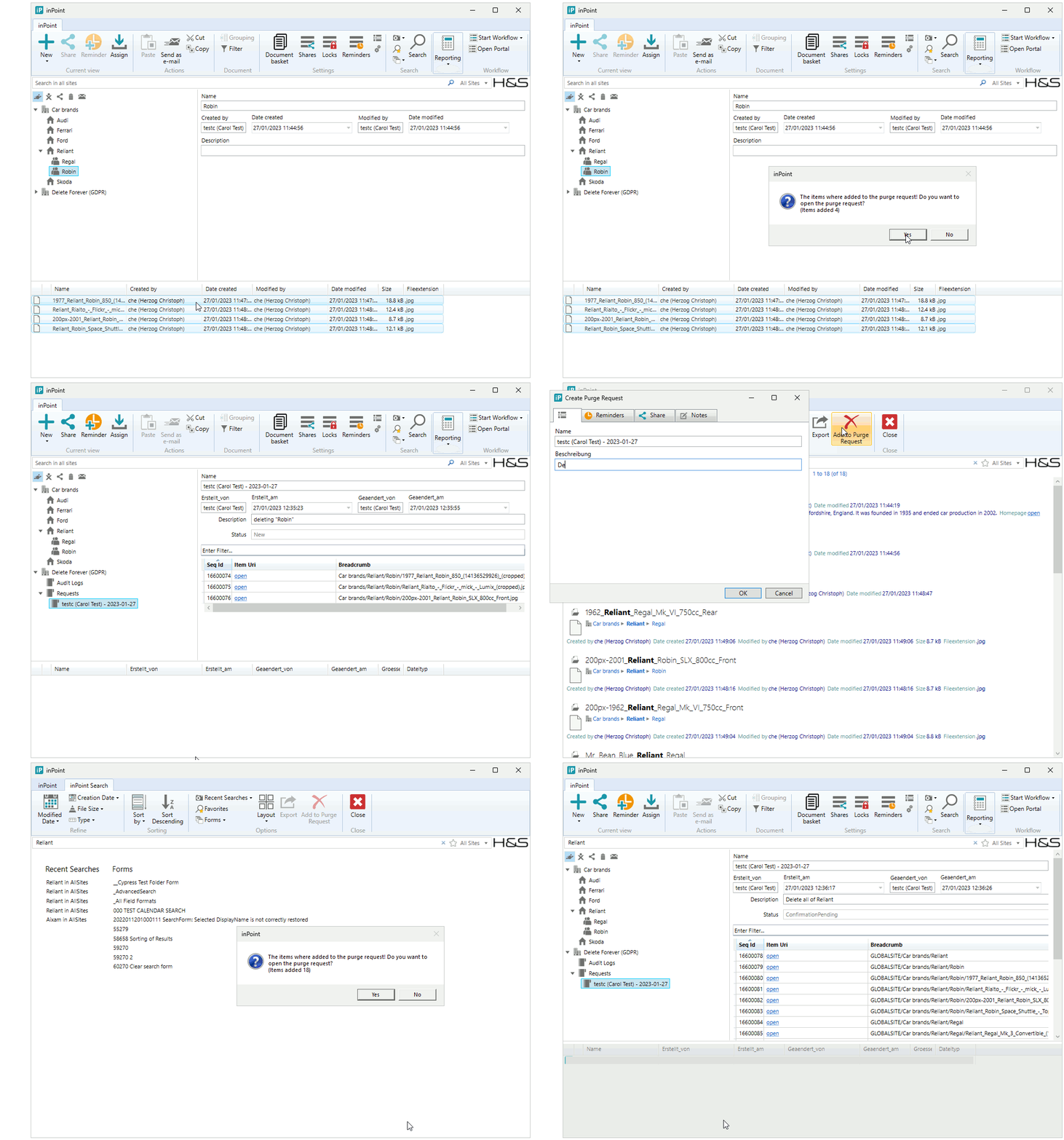
Delete forever - create a purge request with list of folder and documents
Internal: see TFS [#50439]
With this feature a user can delete documents and folder in compliance with the regulations of the
GDPR (General Data Protection Regulation). A list of folder and documents will
be purged from inPoint while logging all information into an audit log which is
then archived.
The user creates a purge request, then adds or removes
documents and folders. After the request is approved using an optional
workflow or directly by a supervisor the items are removed using a background
job.
See the documentation
how to configure and use this feature.
Improved inPoint.Core CreateFolder performance
Internal: see TFS [#55679]
With different code improvements in the inPoint.Core backend we improved the overall performance for the Create Folder Method by 200%.
We added a new Parameter to the Method called "select". You can pass common names and other fields to the method which you want to be returned.
For mass folder creation we recommend passing as select only "$ItemUri", only the ItemUri will be returned and this will speed up the method as well.
Axon.ivy 10.0 is now supported
Internal: see TFS [#55789]
- Complete new user experience
- Support for Azure AD
- New Designer
- For a complete list of new features in Axon.ivy 10.0 see: https://release.axonivy.com/
REMARK: When requesting a new license from AxonIvy make sure the url in the license matches EXACTLY the url you will use to access it (FQDN vs ServerName). If unsure, ask AxonIvy to include all urls!
Export search result to PST or CSV does not longer limit to 10,000 items
Internal: see TFS [#59041]
Its is now possible to export a search result into a PST or as CSV with more than 10.000 items.
NOTE: The fix is only when you export a search result. There are still some restrictions when you click a folder and export the folder. Exporting a folder with >10.000 direct sub-folders or >10.000 documents/emails would still not work.
ElasticSearch is upgraded to 7.17.8
Internal: see TFS [#60966]
When a new folder is created, the "Load subfolders automatically" is now always considered
Internal: see OTRS [2022031601000047]
Internal: see TFS [#61052]
The "Load subfolders automatically" setting is now also checked when the following operations are done:
- Create new folder
- Create new folder quick
- Create new folder from template
- Use DocInNewFolder plugin
Added Slovenian language translations
Internal: see OTRS [2022051001000036]
Internal: see TFS [#62359]
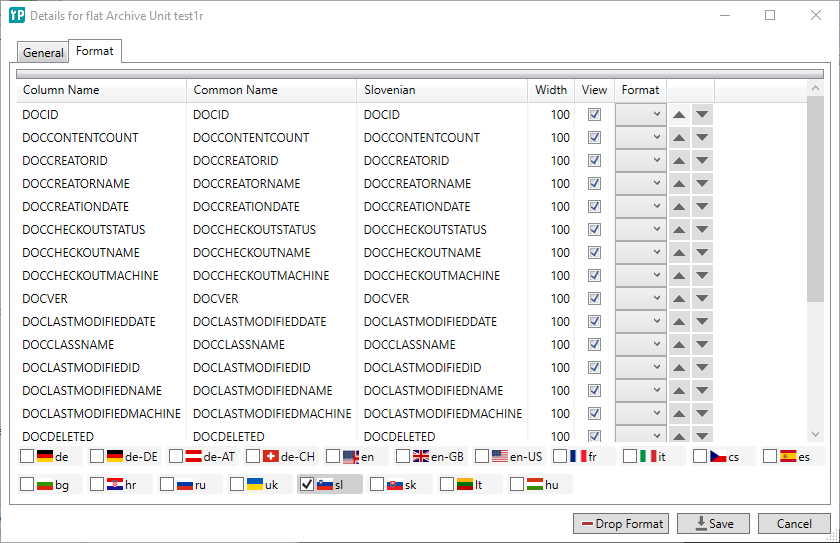
Support for Slovenian was added:
- inPoint.Standalone: The Application was translated into Slovenian.
- inPoint.WF: The Messages where translated into Slovenian.
- Templates: Default templates are now available in Slovenian.
- inPoint.Admin: Still only supports German and English but when managing Flat Archive Units you can now manage Slovenian column names of the element format.
- inPoint.Web: The Application was translated into Slovenian.
Admin Settings from inPoint.Client are now included in the Deployment Life Cycle (DLC)
Internal: see TFS [#62362]
The database logging for "Restricted database access" is included in the following tabs of the "Admin" window:- Menus
- General Settings (there are several settings which are excluded from the logging. For more details read the documentation)
- Templates
'Office Forms Based Authentication' for WebDAV
Internal: see TFS [#62602]
The
WebDAV interface for online editing supports Microsoft Office Forms Based
Authentication in conjunction with inPoint Identity. This also allows external users to edit a document.
Allow to disable the sorting in the search form
Internal: see OTRS [2022070801000064]
Internal: see TFS [#62672]
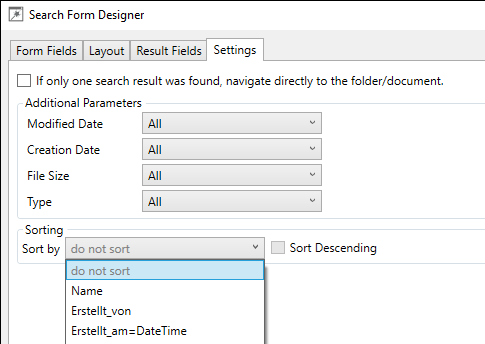
When designing a new search form you can now also disable the sorting: In the Settings tab the Sort-By combo box lists all available sortings. Here you find also an entry "do not sort".
Custom rendering of the search result
Internal: see TFS [#62897]
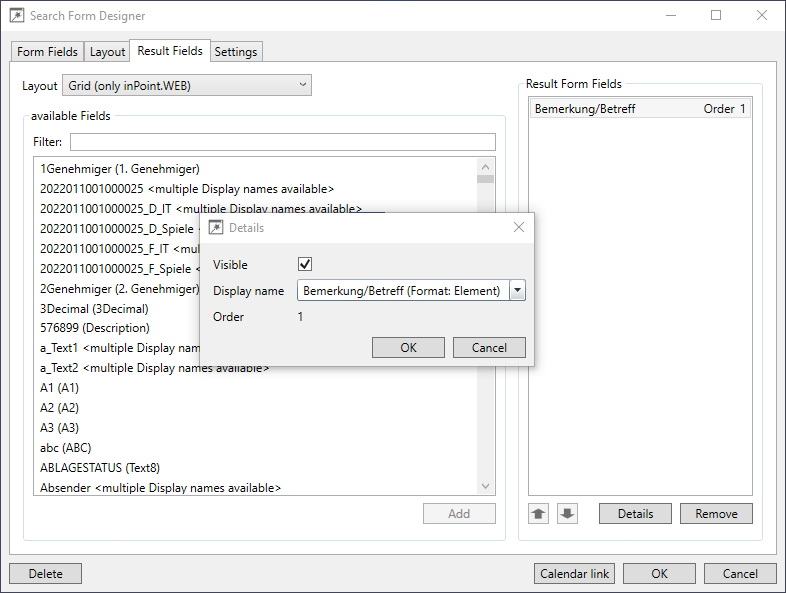
When designing a search form you can now also define a custom search result:
Restrictions:
- Use customized search results only when all clients have been upgraded
- When using without fully upgrading the clients:
- Old clients are ignoring the search result format.
- Updating a form with an old standalone client discards an already added search result format.
- inPoint.Standalone
- Always ignores the Layout selection and the search result fields. The standalone client is just needed for managing the search forms.
- inPoint.Web
- For the Grid-Layout uses the selected search result fields.
- For the other Layouts (List, Map and Calendar) just uses the Layout setting but not any of the selected search result fields.
Usage:
- Open the search form designer in inPoint.Standalone.
- Select the tab "Result Fields".
- You can select a layout for the search result:
- List - this is the layout which is also always used by inPoint.Standalone.
- Grid - inPoint.Web shows the result as a table and supports custom result fields.
- Map - inPoint.Web shows the result as a map.
- Calendar - inPoint.Web shows the result as calendar entries.
- When the Grid-Layout is selected, you can take any fields (like for the search form fields) and add them the the result.
- The fields in the result can be customized like the search form fields. But for result fields you can only configure the visible state, the order and select a display name.
inPoint-Audit writes error messages to the log file
Internal: see OTRS [2022100701000069]
Internal: see TFS [#64311]
Errors in the audit system where previously only written by Trace.WriteLine, so a debug viewer was needed to show this messages.
Now the audit writes messages to the configured log4log with prefix "Pam.Audit"
inPoint-Audit and the output database user
Internal: see OTRS [2022100701000051]
Internal: see TFS [#64313]
Audit tries to log the user:
- It expects that the user-id is provided as integer or a string which can be parsed as integer.
- If so, the USER_ID is logged (per default into the PAM_AUDITLOG table).
- If not, USER_ID=0 and USER_REF=machineName@userName is logged.
The USER_ID / USER_REF should be now filled correctly.
Global Template Properties
Internal: see TFS [#64541]
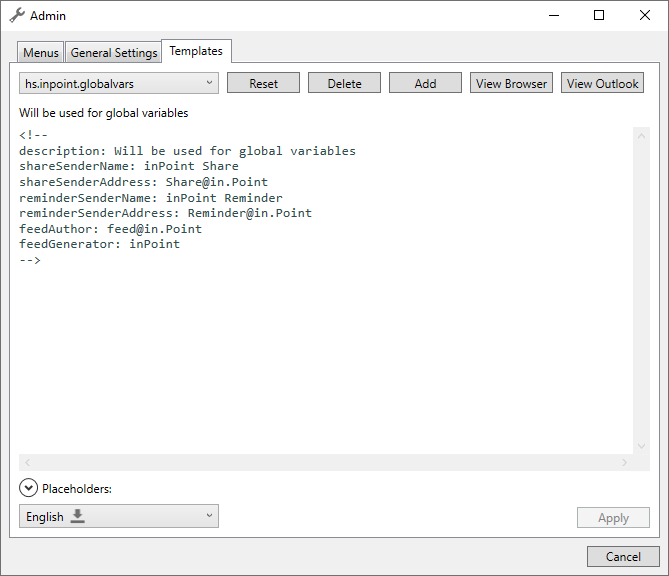
A new template was introduced in this release: hs.inpoint.globalvars
This template currently holds variables for other templates, so that you can change it in one place (instead of in every template).
- shareSenderName: inPoint Share
- shareSenderAddress: Share@in.Point
- reminderSenderName: inPoint Reminder
- reminderSenderAddress: Reminder@in.Point
- feedAuthor: inPoint
- feedGenerator: inPoint
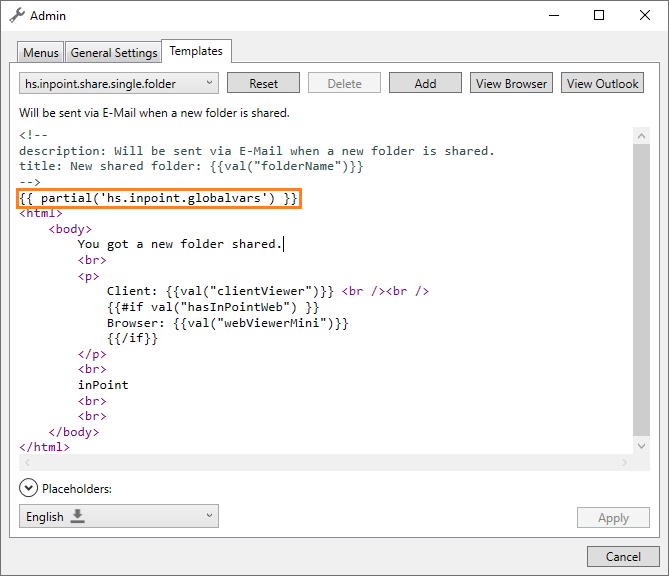
Therefore this template was included in every share and reminder template.
Since this changes the default templates, you need to reset your current ones if you want to have this change.
If you have already set sender data in the templates itself, you can keep your current ones without reseting (for now).
Improvements for preview of inPoint.Templates
Internal: see TFS [#64700]
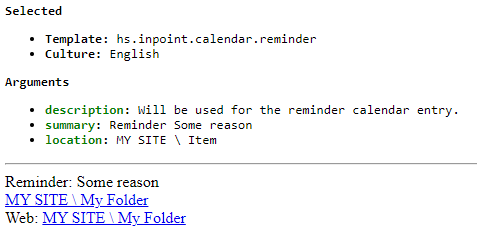
Some improvements to the rending of a preview of an inPoint.Template in the inPoint.Client were made:
- The selected template and the selected culture is rendered in the header
- The arguments are rendered as a list
- Some well known tokens are rendered in green, other tokens in orange
HybridStore: enable/disable single instance
Internal: see TFS [#64715]
It is
possible to completely switch off the single instance
feature in inPoint.HybridStore for the whole tenant.
Infragistics was updated to Version 22.2.30
Internal: see TFS [#64910]
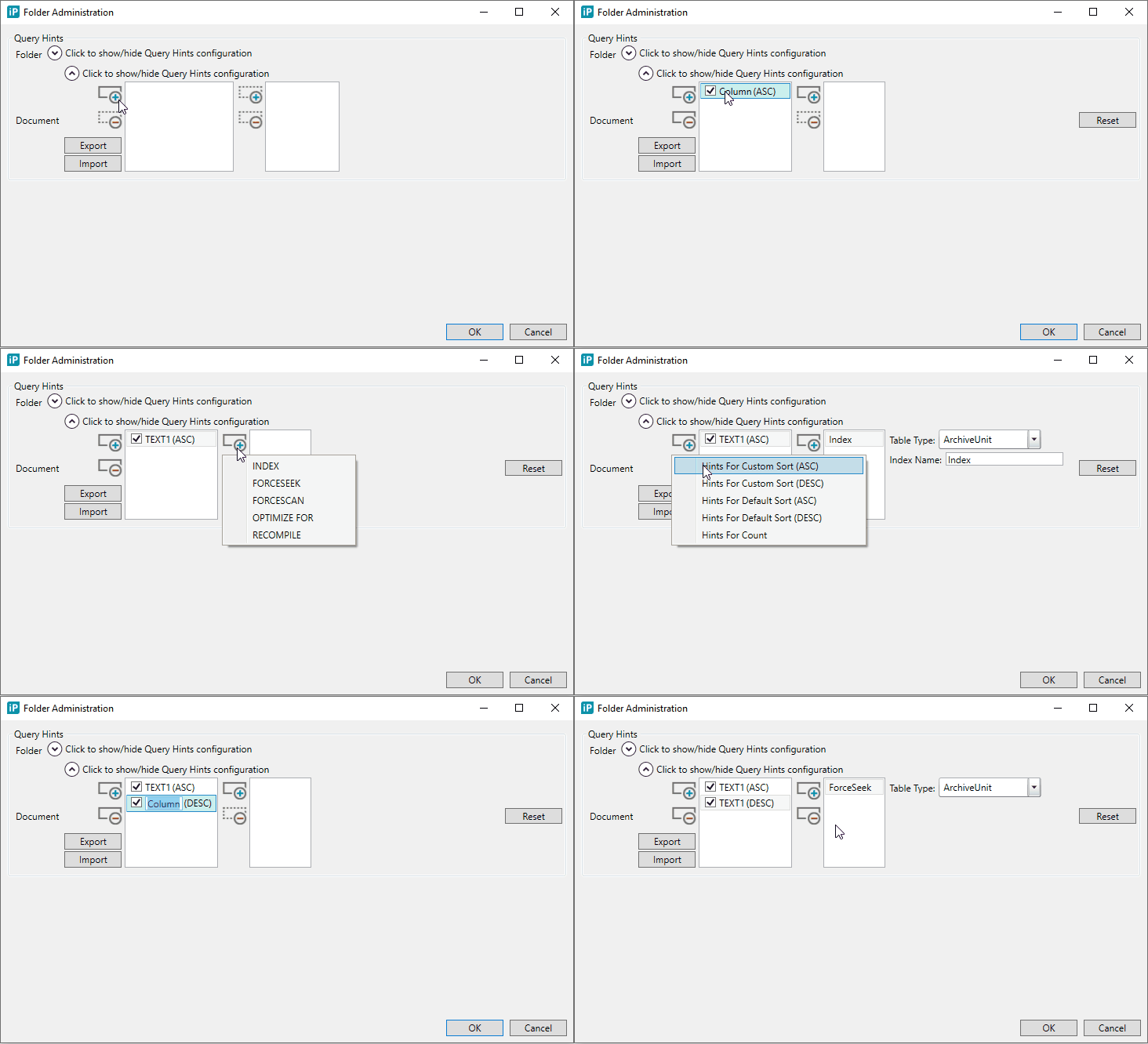
Extended query hints configuration based on sort direction in the inPoint.Client for increasing the performance when retrieving the folder/document list
Internal: see TFS [#65064]
Performance improvements when querying the list of folders/documents were already possible in earlier versions by configuring SQL hints. Now it's configurable also based on the sort direction.
inPoint-Audit supports encrypted DB connection string password
Internal: see OTRS [2022100701000041]
Internal: see TFS [#65230]
When configuring audit, the DBLogAction in the ruleBook now also supports encrypted passwords:
<?xml version="1.0" encoding="utf-8"?>
<configuration>
	<configSections>
		<section name="ruleBook" type="Pam.Audit.Config.RuleBookConfiguration, Pam.Audit" requirePermission="false"/>
	</configSections>
	<ruleBook>
		<rule name="DefaultDB">
			<actions>
				<action type="DBLogAction" >
					...
					<add name="connString" value="... password={0}..." />
					<add name="encryptedPassword" value="[encryptedPassword]" />
				</action>
			</actions>
		</rule>
	</ruleBook>
</configuration>
See also HS_PamAudit.docx
Adding and removing localizations for FlatAU's in inPoint.Admin
Internal: see TFS [#65390]
Sometimes the localizations are running our of sync when you add / remove languages for Flat Archive Units in inPoint.Admin.
This issue should now be fixed.
The descriptions of the language checkboxes have been replaced by flag-icons to take less place.
Also for the case that something gets wrong with the localizations of the element format you can now completely drop the element format and create a new one. Then you loose all changes from the format tab but at least the element format and the localization should work again.
Improvements in Export-Packages
Internal: see TFS [#65463]
The Settings show now a vertical scroll bar when the window is too small.
When exporting search forms some of the forms can have errors:
- The base folder of the search form does not exist anymore
- The form is marked with suffix: [path not found!]
- A caption of a form field does not exist anymore
- The form is marked with suffix: [invalid localizations: <fields...>!]
- The folder of an element format used by a form field does not exist anymore
- The form is marked with suffix: [invalid paths: <fields...>!]
- ...
In this cases you get a message box and can select:
- Yes to immediately abort the export process
- No to close the message box and get no more message boxes of this error
- Cancel or just close to just close the message box and continue
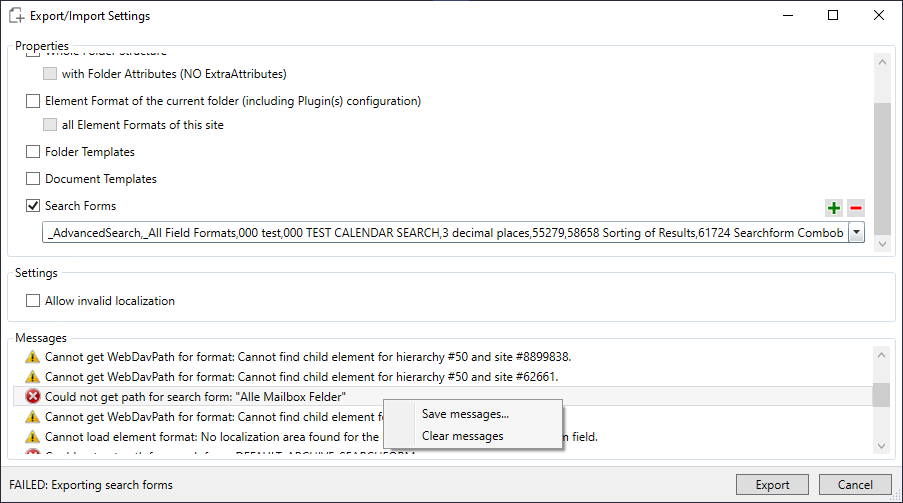
Also the warmings/errors are written to the log. When the log is not empty, it is shown at the bottom of the export window.
When the export run was finished, there might be some errors and warnings. In this case the export-file was not written. Selected elements with errors or warnings are de-selected so you can usually just click the export button again to export all remaining (valid) elements.
You can also save the log or clear it using the context menu in the log control.
When there are any errors in the log, the export window does not automatically close after a successful export.
If you really want to export search forms with warnings you can do this by selecting the invalid forms and check the box "Allow invalid localizations". Then the forms are exported and corrupt element formats or localizations are ignored. After importing you have to fix the forms manually. To save the details about the missing settings it might be useful to save to log. Then it should be easier to add the lost settings after the import.
Also some parts of the dialog have been localized.
The new export window:
Folder templates improvement
Internal: see OTRS [2023020901000024]
Internal: see TFS [#65518]
The folder templates are currently managed only on the client side. It is planned to move the logic to the server side. While preparing the migration a small change in a public interface was needed:
Previous interface:
inPoint.Common.FolderTemplatesUtils(IItemUriRelocator)
New interface:
inPoint.Common.FolderTemplatesUtils(IItemUriRelocator, IFolderTemplateAccessor);
Sample code:
var accessor = new inPoint.API.FolderTemplates.FolderTemplateAccess(IHierarchyProvider);
var ftu = new inPoint.Common.FolderTemplatesUtils(IItemUriRelocator, accessor);
So you need an instance of the HierarchyProvider to create the FolderTemplatesAccess which is then needed by the FolderTempaltesUtilites, and you need a reference to inPoint.API.
inPoint.Core: check existence of a document given by name
Internal: see TFS [#65854]
The existing inPoint.Core method "ExistsDocument" ("HEAD /api/v1/docs") now also accepts an itemUri pointing to the parent folder and a document name. If called without a document name, the itemUri must point to the document itself.