✨ What's New
This list includes all new major features implemented.
Net8 for inPoint.Fulltext
Internal: see TFS [#72608]
inPoint.Fulltext was upgraded to the latest .NET Runtime and now requires "ASP.NET Core Runtime 8" to be installed.
Improvements for ExportToCSV
Internal: see TFS [#73469]
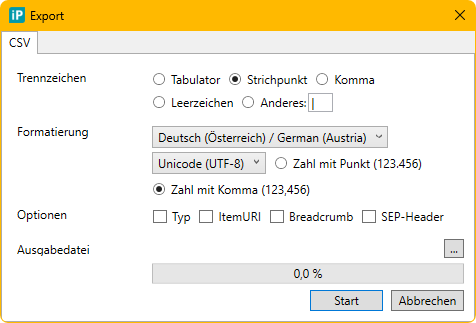
When exporting a search result as CSV, several improvements have been made in inPoint.Standalone:
- You can now select a language to specify the formatting of date, time, and number values. Additionally, you can choose the decimal separator to be a dot (.) or a comma (,).
- You can choose the encoding of the exported file:
- Unicode (UTF-8): This was previously the only default encoding, but Excel might not always detect it correctly on import.
- Unicode: This refers to UTF-16, which is almost always correctly detected by Excel.
- Western European (ISO): ANSI encoding, which is sometimes correctly read by Excel.
- US-ASCII: Always correctly read by Excel, but all non-ASCII characters (such as Ö, Ä, Ü, or ß) are saved as ?.
- You can choose the separator character: semicolon (;), comma (,), tab, or any other character.
- • The option "SEP-Header" emits the selected separator in the CSV file. This helps Excel detect the CSV separator correctly.
For more information, see: microsoft excel - What is the "sep=" metadata you can add to CSVs? - Super User
inPoint.Archive: implement gRCP connection to HybridStore
Internal: see TFS [#73642]
The connection between inPoint.Archive and inPoint.HybridStore can now use gRPC.
As requirement the process connecting to inPoint.HybridStore has to use ".NET Runtime 8" or higher or if using ".NET Framework 4.8" the operating system has to be Windows Server 2022 or later.
If the requirements are met, the HybridStoreUrl in inPoint.Archive.Config can start with "grpcs". Because gRPC is protected by SSL the server must be configured for https and the server name in the url must match the certificate configured in HybridStore.
Example:
HybridStoreUrl="grpcs://inpoint.example.local:823/HybridStore" net.pipe for the net8 standalone client
Internal: see TFS [#73826]
The net.pipe protocol in inPoint.Standalone was broken because of the net8 update and is now working again.
Improve performance between inPoint.Client and inPoint.Web
Internal: see TFS [#74015]
- Speed up creation of communication channels by sharing the factory between all clients
- Update WCF libraries to the latest version
Custom formats in ExtraAttributes
Internal: see OTRS [2024041701000058]
Internal: see TFS [#74079]
You can now specify a format using tokens for document, folder and extra-attributes:
- \{Datum1\} can now be also written as \{Datum1:yyyy-MM-dd\}.
- \{Folder.Nummer1\} can now be also written as \{Nummer1:00000\} or \{Nummer1:N3\}.
The format specifier is just given to the ToString() method. Therefore, you can use the format specifiers described in Overview: How to format numbers, dates, enums, and other types in .NET - .NET | Microsoft Learn
Note: No type conversion is performed. For example, formatting a String with 'yyyy' would not produce the expected result, even if the string contains avalid date/time value.
inPoint.Indexer: indexing of password protected PDF
Internal: see TFS [#74249]
The PDF to text converter now supports a list of passwords
to access password protected documents. See the documentation for more
details.
Added Thai to the standalone client
Internal: see OTRS [2024111401000086]
Internal: see TFS [#74486]
Support for Thai was added:
- inPoint.Standalone: The Application was translated into Thai.
- inPoint.WF: The Messages were translated into Thai.
- Templates: Default templates are now available in Thai.
- inPoint.Admin: Still only supports German and English but when managing Flat Archive Units you can now manage 'Thai' column names of the element format.
inPoint.Core migrated from HTTP.sys to Kestrel
Internal: see TFS [#75466]
inPoint.Core was migrated from HTTP.sys to Kestrel.
See the documentation inPoint.Core Configuration · inPoint.Enterprise for the needed changes in the inPoint.Core configuration.