✨ What's New
This list includes all new major features implemented.
inPoint.Wizard: Include inPoint.Web.IdentityServer
Internal: see TFS [#55093]
inPoint.Web.IdentityServer is now included in the inPoint.Wizard.
Supporting LDAPS when connecting to an Active Directory Domain Services (AD DS)
Internal: see OTRS [2020111701000024]
LDAPS is available for synchronizing users and groups from Active Directory Domain Services
Internal: see TFS [#56703]
Synchronizing users and groups from Active Directory Domain Services can be performed using LDAPS (Lightweight Directory Access Protocol over SSL).
See the LDAPS
settings in the configuration documentation.
Synchronizing users without specifying the user account in the web.config required for connecting to Active Directory.
Internal: see TFS [#56703]
It's possible to synchronize users and groups from Active Directory without specifying the user name and password used for connecting to the AD in the web.config.
Windows Server 2012 / 2012 R2 + SQL Server 2012 is out of support
Internal: see TFS [#67195]
Get Multiple Documents
Internal: see TFS [#70763]
Extended HierarchyProvider.Document_GetMultipleAsync
List<HierarchyDocument> Document_GetMultipleAsync(List<string> itemUris, bool returnDeleted = false)Throws when the first document with no access was loaded and was extended to:
List<HierarchyDocument> Document_GetMultipleAsync(List<string> itemUris, bool returnDeleted = false, bool returnRemaining = false)When returnRemaining was set, the method returns all elements with access and ignores the elements with no access. The No-Access exception is thrown when all elementn where ignored. For unit tests (and mocking) this would be a breaking change. For normal usages this is just an extension.
Extended UnifyWCF.GetMultipleDocuments
UnifyWcf.GetMultipleDocuments(List<string> itemUris, bool returnDeleted)was also extended into:
UnifyWcf.GetMultipleDocuments(List<string> itemUris, bool returnDeleted, bool returnRemaining)These methods have the same behavior that the HierarchyProvider methods.
Net8 for Pam.Archive
Pam.Archive supports .NET Runtime 8
Internal: see TFS [#70903]
The database and document layer of inPoint.Enterprise now supports ".NET Runtime 8". For accessing files the old legacy connections to HSM or direct access to PAM-STORAGE3 are not supported.
inPoint.Jobs support .NET Runtime 8
Internal: see TFS [#70903]
The service hosting the inPoint.Jobs was migrated to ".NET Runtime 8". Older jobs created using ".NET Framework 4" are still supported. For isolating the jobs from each other, each job will run in an own worker process.
Net8 for HybridStore
inPoint.HybridStore added gRPC interface
Internal: see TFS [#71079]
inPoint.HybridStore can now also be reached via gRPC. To enable the feature add a https connection in the configuration (using appSettings.json).
inPoint.HybridStore is upgrade to .NET Runtime 8
Internal: see TFS [#71079]
inPoint.HybridStore was upgraded to the latest .NET Runtime and now requires "ASP.NET Core Runtime 8" to be installed.
During an update the configuration will be automatically upgraded to the new json format (from HybridStoreSv.exe.config to appsettings.json).
The fastest connection to HybridStore is using net.tcp with localhost. If the ports where not modified in the configuration that would be:
net.tcp://localhhost:822/HybridStoreExtraAttribute Grid can group by column
Internal: see OTRS [2024022301000013]
Internal: see TFS [#71272]
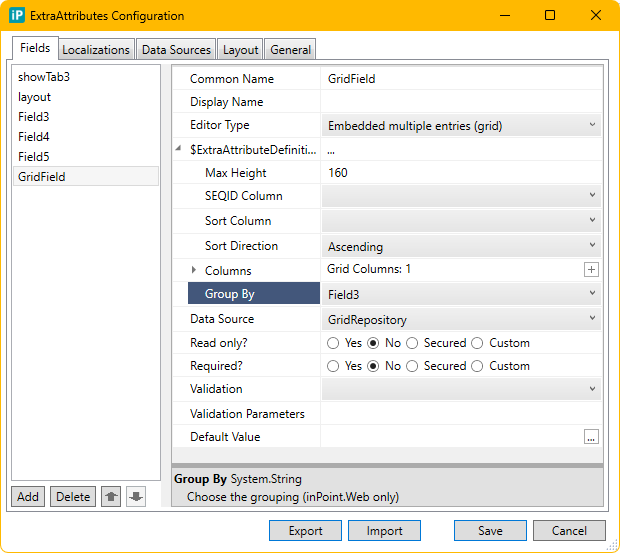
The ExtraAttributes grid has now a new option: Group By
- You can select a column which will be used for grouping.
- This option can be configured in inPoint.Standalone but is only implemented in the grid of inPoint.Web
inPoint.Standalone is now a NET-8.0 application
Internal: see TFS [#71350]
inPoint.Standalone was migrated from NetFramework 4.8 to NET-8.0.
So, you need an installed NET-8.0 runtime to run inPoint.Standalone and inPoint.Sync.
Since the explorer integration (inPoint.Shell extension) and the Microsoft Office Add-Ins do not support NetCore, they are still using the NetFramework 4.8. You do not need to install the
NetFramework 4.8 runtime manually because the NET-8.0 runtime can also run NetFramework 4.8 applications.
Because of this change, the inPoint.Plugins are needed as NetFramework 4.8 and as NET-8.0 build. They are installed into separate folders on the inPoint.Server (Client_* and Client-net8_*) and are also handled on the client side in separate folders in the temp directory of the current user.
NOTE: Ensure that customer plugins are also built for NET-8.0 and NetFramework 4.8 at least when the
explorer integration and the office add-ins are used
Performance improvements: Paging in the folder/document links
Filtering folder/document links
Internal: see TFS [#71372]
The filtering is applied also on the folder/document links.
Paging the folder/document links with improved performance
Internal: see TFS [#71372]
The folder/document links are paginated with improved performance.
Applying additional mailbox rights on a mailbox of deleted AD user
Internal: see TFS [#71374]
The additional mailbox rights are also merged with the rights of the deleted AD user mailbox during the Mailbox synchronization job.
Added Romanian to the standalone client
Internal: see TFS [#71490]
Support for the Romanian language was added:
- inPoint.Standalone: The Application was translated into Romanian.
- inPoint.WF: The Messages were translated into Romanian.
- Templates: Default templates are now available in Romanian.
- inPoint.Admin: Still supports only German and English but when managing Flat Archive Units you can now also manage 'Romanian' column names of the element format.
Improved performance when browsing in the tree containing many folder links
Internal: see TFS [#71615]
The performance has been improved when browsing in the tree containing many folder links.
inPoint.Core: delay indexing of folder/documents when creating folder structures
Internal: see OTRS [2024040501000026]
Internal: see TFS [#71686]
All methods in inPoint.Core which create or modify objects (folder, document, shares) which would cause a fulltext index have an extra optional parameter to skip the indexing (bool disableFulltext). Later the indexing has to be triggered by a separate call to inPoint.Core.
Example:
PUT/api/v2/docs           changes the file content of a Document by creating a new version

new optional parameter:boolean disableFulltext (query)When creating the object (document, folder, etc.) the fulltext indexing should be disabled.
Index a folder:
POST /api/v1/folders/index
Index a single folder and all of its children (adds it to the fulltext queue). (FlatAU is not allowed!)

Parameters:
string itemUri* (query) A valid itemUri pointing to a Folder.
Index a document:
POST /api/v1/docs/index
Index a single document (adds it to the fulltext queue).

Parameters:
string itemUri* (query) A valid itemUri pointing to a Document.
inPoint.Plugins where split into a windows and a non-windows part
Internal: see TFS [#71732]
The inPoint.Plugins were split into two DLL's:
inPoint.Plugins.dll
This DLL has no Windows, WPF or Infragistics references anymore. So, it contains only
some configuration objects and the non-UI parts of the plugins (like SaveClassification(), ...).
Some plugins (which are only supported by inPoint.Standalone)
were completely moved to inPoint.Plugins.WPF.dll.
inPoint.Plugins.WPF.dll
This DLL has all the Windows, WPF and Infragistics references and contains all parts that were moved out from inPoint.Plugins.dll.
Loading and registering the plugins
All files in the plugin folder are downloaded by the client. Also, all files in this folder are added to the AssemblyResolve,
so you can still load all types from this directory by referencing them directly.
The plugins which are then loaded and registered can now be controlled by the Methods:
PluginsManager.LoadPlugins()
This registers all plugins from all files matching *plugin*.dll.
So, this call should do the same as before: It registers types from
inPoint.Plugins.dll (and also from inPoint.Plugins.WPF.dll).
Then it initializes all plugins in the *Plugins-properties (classificationPlugins, archiveSuggestionPlugins, ...)
and also all in the new *WpfPlugins-properties classificationWpfPlugins, archiveSuggestionWpfPlugins, ... of the PluginManager.
PluginsManager.LoadPluginsWithoutUI()
This registers all plugins from all files matching *plugin*.dll
but excludes files matching *plugin*wpf*.dll.
So, it registers types from inPoint.Plugins.dll but not from inPoint.Plugins.WPF.dll.
This call should be used when the application wants to load the plugins without any Windows or WPF references.
It is called by inPoint.Web or should be used when running in a Linux-Docker container.
NOTE: Since running in Linux-Docker is not tested yet, there might still be Windows references even when using LoadPluginsWithoutUI().
For example, code referencing RegistryKey or some interop DLLs might fail at runtime because such references may only resolve when the code gets executed (or a type is loaded).
inPoint.Core: Sharing
Internal: see OTRS [2024032701000059]
Internal: see TFS [#71801]
Core has now new methods for managing folder and document shares:
- A folder can be shared by a (non-admin) user only once (= one share name per itemUri/creator)
This is because the clients would not fully support multiple shares for the same ItemURI! - Create / List / Delete (but no update)
- To implement an "update" for a share you have to:
- read the share
- update the result
- delete the share
- create a new one
- This invalidates the existing Share-ItemURIs because on re-creation new Share-IDs are generated. Therefore, links previously sent by email are invalid, but the user can still browse for the new share.
This is the existing behavior when updating shares in the client!
CreateFolderShare(itemUri, elementShareCreationDto, optionalImpersonationUser) - POST /api/v1/shares/folder
BODY ElementShareCreationDto - Expects Folder-ItemURI's
- Does not allow ItemURI's with ShareId
- Creates a new share on for the given folder and user
- ElementShareCreationDto:
- Details of the new share
- List of permissions (user/groups and rights)
- Notification details
- The creator is the user of the connection of the optionalImpersonationUser
- RETURNS HTTP-201 ItemURI with ShareID of the created share and a link to GetElementShareInfo(shareId)
RETURNS HTTP-403 There is already a share on this folder for this user
CreateDocumentShare(itemUri, documentShareCreationDto, optionalImpersonationUser) - POST /api/v1/shares/document
BODY DocumentShareCreationDto - Expects Document-ItemURI's
- Does not allow ItemURI's with ShareId
- Creates a new share on for the given document and user
- ElementShareCreationDto:
- Details of the new share
- List of permissions (user/groups and rights)
- Notification details
- The creator is the user of the connection of the optionalImpersonationUser
- RETURNS HTTP-201 ItemURI with ShareID of the created share and a link to GetDocumentShareInfo(shareId)
RETURNS HTTP-403 There is already a share on this document for this user
GetElementShareInfo(shareId) - GET /api/v1/shares/folder/{shareId}
- since the ShareID is a technical identifier there can be maximal one share per id
- RETURNS HTTP-200 ElementShareInfoDto (= details of the share)
RETURNS HTTP-404 No share with this ShareId for this user found
GetDocumentShareInfo(shareId) - GET /api/v1/shares/document/{shareId}
- since the ShareID is a technical identifier there can be maximal one share per id
- RETURNS HTTP-200 DocumentShareInfoDto (= details of the share)
RETURNS HTTP-404 No share with this ShareId for this user found
ListElementShareInfo(itemUri) - GET /api/v1/shares/folders?itemUri=...
- Expects Folder-ItemURI's
- Currently there can be only one share per itemUri/creator.
Maybe in the future this method will return multiple shares when called by an administrator (up to one per creator)
- RETURNS HTTP-200 List<ElementShareInfoDto> (= details of the share)
RETURNS HTTP-204 No shares with this itemUri for this user found
ListDocumentShareInfo(itemUri) - GET /api/v1/shares/documents?itemUri=...
- Expects Document-ItemURI's
- Currently there can be only one share per itemUri/creator.
Maybe in the future this method will return multiple shares when called by an administrator (up to one per creator) - RETURNS HTTP-200 List<DocumentShareInfoDto> (= details of the share)
RETURNS HTTP-204 No shares with this itemUri for this user found
RemoveAllShares(shareItemUri) - DELETE /api/v1/shares?shareItemUri=...
- Expects any ItemURI's with a ShareId
- RETURNS HTTP-200 True - the share was removed
RETURNS HTTP-200 False - no share was removed (maybe there was no share, or the user has no permission to delete)
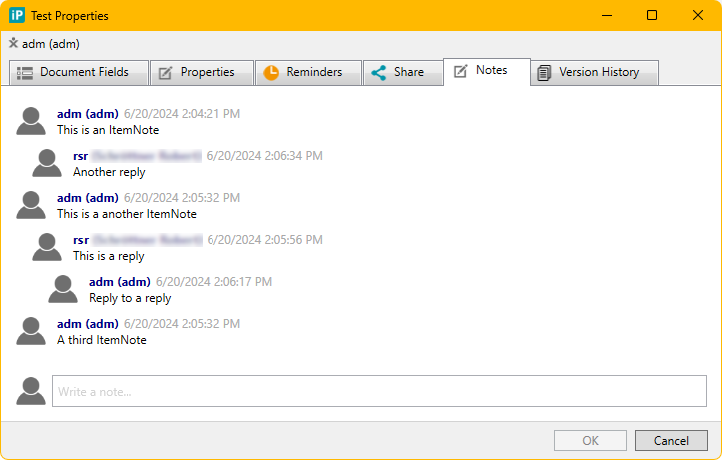
Show replies on ItemNotes and allow to reply
Internal: see TFS [#72088]
You can now write replies on ItemNotes.
Search forms have a configuration option "Label Width"
Internal: see TFS [#72524]
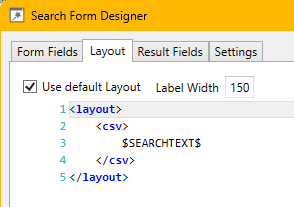
The search forms have a new option to configure the width of the labels of the search fields.
The default value is 0 (which means 100 pixel)


New inPoint CSE Setup with version 6.4.101 is included
Internal: see TFS [#72863]
ElementFormat fields with Auto-Width
Internal: see TFS [#73343]
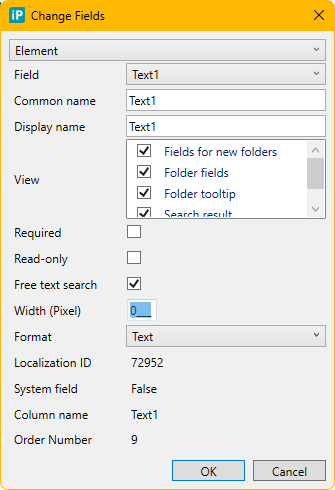
It is now possible to set the Column-Width of inPoint.Fields to 0.
This means that the client renders this column with auto-width.
This is visible in DocList, KidsGrid and DocumentHistory.
This is visible in DocList, KidsGrid and DocumentHistory.
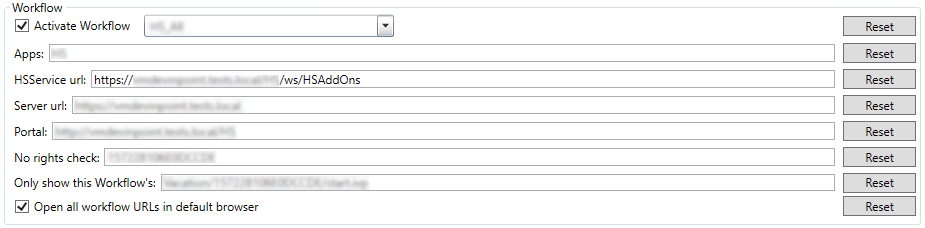
HTTPS support for the HSService Url
Internal: see OTRS [2024082801000048]
Internal: see TFS [#73346]
The communication between the HSAddons (HSService) in AxonIvy and inPoint will, from now on only be using HTTPS. Therefore it is now possible to close all access to AxonIvy via its own port and only use the configured reverse proxy - if enabled.
REMARK: It is not possible to use HTTP anymore. Therefore all HTTP urls have to be updated. See the Breaking Changes section for more details.
net.pipe for the net8 standalone client
Internal: see TFS [#73826]
The net.pipe protocol in inPoint.Standalone was broken because of the net8 update and is now working again.
Improve performance between inPoint.Client and inPoint.Web
Internal: see TFS [#74015]
- Speed up creation of communication channels by sharing the factory between all clients
- Update WCF libraries to the latest version